Chapter 1: Computing Foundations
Before you can understand CPUs, GPUs or supercomputers, you need the basics: what a computer is, how it stores numbers, text and pictures as bits, and how tiny switches called logic gates are combined into a working processor. This chapter starts from zero with everyday analogies, then shows how programs run, how we measure speed, and how chips have improved over 80 years of history. Take it slowly — everything later in the guide builds on these ideas.
1.1 What Is a Computer?
A computer is a machine that takes in information, follows a list of instructions to work on it, and gives back a result — and it can keep both the information and the instructions for later. The physical parts you can touch are called hardware; the instructions are called software. Computers come in every size, from a chip inside a washing machine to a supercomputer filling a warehouse.

Think of it like…
A computer is like a kitchen: ingredients come in (input), the cook follows a recipe (processing), dishes go out (output), and the fridge and recipe book keep things for later (storage).
Real-world example
Amara, a first-year student, uses a self-checkout at her local supermarket. The scanner reads a barcode (input), a small computer looks up the price and adds it to the total (processing), the screen shows £3.49 and a receipt prints (output), and the shop's server records the sale so stock can be reordered (storage). The same four-step pattern runs inside her phone, her car's engine controller and the cloud servers behind her music app.
How it works
- Input devices (keyboard, touchscreen, sensors, network) turn real-world information into data.
- The processor (CPU) follows software instructions to calculate, compare and decide.
- Memory (RAM) holds the program and data being worked on right now; it forgets everything when the power goes off.
- Storage (SSD, hard disk, cloud) keeps files and programs long-term.
- Output devices (screen, speaker, printer, motors, network) deliver the result.
- Layers of software — firmware, the operating system and applications — tell the hardware what to do.
Who uses it
Every IT role starts here: technicians, developers, system administrators, embedded engineers and cloud engineers all describe systems in terms of input, processing, output and storage.
Key takeaway
Learn the IPOS model (input-process-output-storage) and the difference between hardware, software and firmware — they are classic first exam questions.
Going deeper
- Computers are usually grouped by role: embedded (one job, firmware only), personal (one user, general purpose), server (many users over a network) and HPC or supercomputer (one huge job split across thousands of nodes).
- Volatility is the key memory-versus-storage difference: DRAM loses its contents almost immediately when power is cut, while flash and magnetic disks keep data for years — so 'saving' means copying data from RAM to storage.
- A working system is layered: hardware runs firmware (UEFI on a PC, a boot ROM on a microcontroller), which loads an operating-system kernel, which manages applications — each layer hides detail from the one above.
- The same basic design scales enormously: a small microcontroller may have a few kilobytes of RAM and run at tens of megahertz, while a 2026 cloud server has terabytes of RAM and hundreds of cores.
- In data centres the unit of 'a computer' keeps growing: hyperscalers buy whole racks at a time, and AI training jobs treat thousands of GPUs linked by fast networks as one giant machine.
- Mainframes such as IBM's z17 trade raw single-thread speed for reliability and input/output throughput, with redundant parts designed to keep transaction systems running for years without unplanned downtime.
Common mistakes & misconceptions
- Confusing RAM with storage: '16 GB of memory' is working space that empties at power-off, while '1 TB' is long-term storage; more storage does not speed up multitasking.
- Thinking firmware is hardware: firmware is software stored on a chip, so it has bugs and security fixes and should be updated like other software.
- Assuming 'computer' means a PC: most computers are embedded microcontrollers hidden in cars, appliances and sensors, shipped by the billions every year.
Try it: See what hardware your own computer has
# Windows (PowerShell) — the older 'wmic' tool is deprecated
Get-CimInstance Win32_Processor | Select-Object Name, NumberOfCores, NumberOfLogicalProcessors
Get-CimInstance Win32_ComputerSystem | Select-Object TotalPhysicalMemory

# Linux
lscpu
free -h

# macOS
sysctl -n machdep.cpu.brand_string
Key chips, architectures, standards, tools & concepts
| Name | What it does | Example |
|---|---|---|
| Hardware General computing concept · Concept · Current · Beginner |
The physical parts of a computer you can touch: processor, memory chips, storage drives, screen, keyboard and circuit boards. | Swapping a laptop's 8 GB memory module for a 16 GB one is a hardware upgrade. |
| Software General computing concept · Concept · Current · Beginner |
Programs and their data that tell the hardware what to do, including the operating system and applications. | Windows, a web browser and a photo editor are all software running on the same laptop hardware. |
| Firmware UEFI Forum (PC firmware standard); device makers · Concept · Current · Beginner |
Software stored permanently on a chip inside a device, controlling it at the lowest level and starting it up. | A PC's UEFI firmware checks the hardware and loads the operating system every time you press the power button. |
| IPOS model (Input-Process-Output-Storage) Computing education concept · Concept · Current · Beginner |
The four jobs every computer performs; a simple way to describe any computer system. | A smart thermostat inputs room temperature, processes it against your setting, outputs a heating signal and stores your weekly schedule. |
| CPU (Central Processing Unit) Intel, AMD, Apple, Qualcomm and other Arm-based chip makers · Component · Current · Beginner |
The main processor that follows program instructions one after another, doing arithmetic, comparisons and decisions. | When you open a spreadsheet, the CPU recalculates every formula and decides what to redraw on screen. |
| RAM (main memory) JEDEC (DDR memory standards) · Component · Current · Beginner |
Fast working memory holding the programs and data in use; it is volatile, so its contents vanish when power is lost. | A laptop with 16 GB of RAM can keep a browser, a music app and a code editor open without slowing down. |
| Storage (SSD / HDD) Samsung, WD/SanDisk, Kioxia, Seagate and others · Component · Current · Beginner |
Non-volatile storage that keeps files, programs and the operating system even when the computer is switched off. | A 1 TB SSD holds the operating system, games and photos, and copies them into RAM when they are needed. |
| Motherboard Board makers such as ASUS, Gigabyte, MSI and ASRock · Component · Current · Beginner |
The main circuit board connecting the CPU, memory, storage and expansion cards, with wiring (buses) carrying data between them. | A desktop builder checks that the motherboard's socket matches the chosen CPU before ordering parts. |
| Microcontroller (embedded computer) e.g. Arm Cortex-M based chips, Microchip AVR and PIC, Espressif ESP32 · Processor · Current · Beginner |
A complete small computer on one cheap, low-power chip, built into another product to do one dedicated job. | A microwave's keypad, display and timer are run by a microcontroller costing well under a pound. |
| Personal computer (desktop / laptop) Many makers (Lenovo, HP, Dell, Apple and others) · System · Current · Beginner |
A general-purpose computer used by one person at a time, running an operating system and many applications. | A student's laptop runs lecture notes, coding tools and video calls on the same machine. |
| Smartphone Apple, Samsung, Google and others; Arm-based system-on-chips · System · Current · Beginner |
A pocket computer built around a system-on-a-chip combining CPU, graphics, an AI engine, camera processing and a modem. | One phone chip, smaller than a fingernail, runs the camera, maps, games and voice assistant all at once. |
| Server Dell, HPE, Lenovo, Supermicro and others · System · Current · Beginner |
A powerful computer that provides services — websites, files, databases — to many other computers over a network, usually in a data centre. | A single rack server could host the online shop of a small fictional brand, Kettleby Crafts, serving thousands of shoppers a day. |
| Mainframe IBM (IBM Z family, e.g. z17) · System · Current · Intermediate |
A very reliable, high-throughput computer used by banks, airlines and governments to process enormous volumes of transactions. | Many large banks still authorise card payments and update accounts on mainframes running around the clock. |
| Supercomputer Ranked twice a year by TOP500 (top500.org) · System · Current · Beginner |
One of the world's fastest computers, built from thousands of linked nodes, used for science, weather forecasting and AI. | Weather services run forecast models on supercomputers performing quadrillions of calculations every second. |
| Peripherals (input and output devices) Connected via USB, Bluetooth, HDMI/DisplayPort and other interfaces · Component · Current · Beginner |
Devices outside the core computer that feed it data or present results: keyboards, mice, cameras, sensors, displays, printers and speakers. | A USB barcode scanner is an input peripheral: it types each product code into the till software as if it were a keyboard. |
1.2 Types of Compute: CPU, GPU, TPU, NPU, MCU and the xPU Family
Not every processor is a CPU. Engineers build different kinds of compute chips for different jobs: all-rounders (CPUs), massively parallel number crunchers (GPUs), AI specialists (TPUs and NPUs), tiny low-power controllers (MCUs), rewireable chips (FPGAs) and single-purpose custom chips (ASICs). Most modern devices combine several of them, and this topic is your map of the whole family before later chapters zoom in.
Think of it like…
Think of a hospital: the general doctor (CPU) can handle anything, a team of nurses (GPU) does thousands of routine checks at once, the radiologist (TPU or NPU) only reads scans but does it brilliantly, and the door sensor (MCU) does one tiny job all day on almost no energy.
Real-world example
Priya's photo app shows the whole family at work. The phone's CPU runs the app, the GPU draws the screen, the NPU recognises faces, and an MCU in the camera module controls autofocus. When she uploads the album, a data-centre CPU receives it, a DPU handles the network traffic, and GPUs or TPUs tag the pictures with AI.
How it works
- Start from the job: is it general logic, huge parallel maths, AI, signal processing, networking or one fixed task?
- General, branch-heavy work goes to a CPU; the same sum on millions of numbers goes to a GPU or AI accelerator.
- Tiny, battery-powered or real-time control goes to a microcontroller (MCU).
- Fixed jobs made in huge volume justify an ASIC; jobs that change or ship in small volume suit an FPGA.
- A host CPU almost always stays in charge, handing work to accelerators over PCIe, NVLink or an on-chip bus.
- Compare chips using the right metric: IPC and GHz for CPUs, FLOPS and memory bandwidth for GPUs, TOPS per watt for NPUs, microamps per MHz for MCUs.
Who uses it
Everyone in computing meets this map: hardware buyers, cloud and AI engineers choosing instances, embedded developers choosing chips, and students facing the classic interview question "CPU vs GPU vs TPU?".
Key takeaway
Remember the flexibility-efficiency trade-off: CPU → GPU → FPGA → NPU/TPU → ASIC, each step more efficient at its job but less flexible.
Going deeper
- The "xPU" names are mostly marketing shorthand, not formal standards: the same letters can mean different things (IPU is Graphcore's Intelligence Processing Unit and also Intel's Infrastructure Processing Unit), so always check who makes the chip.
- Typical power budgets span nine orders of magnitude: a sleeping MCU draws microwatts, a phone SoC a few watts, a desktop CPU 65-250 W, and a 2026 data-centre AI GPU around 1,000 W or more.
- Most chips today are heterogeneous: a laptop or phone SoC puts CPU cores, a GPU, an NPU, an ISP, a DSP, video engines and a security processor on one die, and the operating system sends each task to the best engine.
- A typical AI server contains several types at once: two host CPUs, four to eight GPUs or accelerators, one or more DPUs/SmartNICs for networking, and a small baseboard management controller (BMC) chip for remote management.
- Each type is programmed differently: CPUs with ordinary languages, GPUs with CUDA, ROCm or SYCL, NPUs and TPUs through AI frameworks and compilers (ONNX Runtime, XLA), MCUs in C or MicroPython, and FPGAs and ASICs with hardware description languages such as Verilog.
- Economics decides between FPGA and ASIC: an ASIC can cost tens to hundreds of millions of dollars to design at leading-edge nodes but is cheap per unit, so it only pays off at high volume or for huge efficiency gains.
- "Compute" in cloud price lists also means virtual machine families — general-purpose, compute-optimised, memory-optimised, GPU/accelerator instances — which map back to these chip types (see the cloud chapter).
Common mistakes & misconceptions
- Mixing up the two TPUs: Tensor Processing Unit is Google's AI chip, while Trusted Platform Module is a security chip that stores keys — completely different things.
- Thinking a GPU or NPU replaces the CPU: accelerators cannot boot or run the operating system on their own; a host CPU sends them work.
- Comparing TOPS or FLOPS across vendors at face value: check the number format (FP16, FP8, INT8, FP4) and whether sparsity is included, or the comparison is meaningless.
- Assuming a microcontroller is just a slow CPU: it is a whole computer on a chip, with its own flash, RAM and peripherals, designed for low power and real-time response.
Try it: List the different compute engines inside your own computer
# Windows (PowerShell)
Get-CimInstance Win32_Processor | Select-Object Name, NumberOfCores
Get-CimInstance Win32_VideoController | Select-Object Name
Get-PnpDevice -Class ComputeAccelerator -ErrorAction SilentlyContinue   # NPUs show here on many AI PCs

# Linux
lscpu | head -n 15
lspci | grep -iE 'vga|3d|display|processing|accelerator'
nvidia-smi -L        # only if an NVIDIA GPU and driver are installed
Key chips, architectures, standards, tools & concepts
| Name | What it does | Example |
|---|---|---|
| CPU — the general-purpose processor Intel, AMD, Arm-based designs (Apple, Qualcomm, AWS Graviton), RISC-V vendors · Processor · Current · Beginner |
A few to a few hundred powerful cores that run any program, excelling at branchy, sequential logic and running the operating system. | A web server's CPU parses requests, checks passwords, queries a database and decides what each user sees. |
| GPU — the parallel throughput processor NVIDIA, AMD, Intel, Apple, Arm (Mali), Qualcomm (Adreno) · Accelerator · Current · Beginner |
Thousands of simple cores running the same instruction on many data items, first for graphics, now also for AI and science. | A game's GPU shades millions of pixels per frame; in a data centre the same kind of chip trains a language model. |
| TPU — Tensor Processing Unit Google (in-house since 2015; Cloud TPU) · Accelerator · Current · Beginner |
Google's AI ASIC built around systolic arrays for matrix multiplication, sold only as a Google Cloud service and used in its own products. | A start-up rents a Cloud TPU pod slice to train a translation model instead of buying GPUs. |
| NPU — Neural Processing Unit Qualcomm (Hexagon), Intel, AMD (XDNA), Apple (Neural Engine), MediaTek · Accelerator · Current · Beginner |
A small, power-efficient AI engine inside phone and laptop chips, rated in TOPS, for on-device features like blur, captions and assistants. | Copilot+ PCs need an NPU of at least 40 TOPS so features like live captions run locally without draining the battery. |
| MCU — microcontroller unit STMicroelectronics (STM32), Microchip (AVR, PIC), Espressif (ESP32), Raspberry Pi (RP2350), NXP, Renesas · Processor · Current · Beginner |
A complete tiny computer on one chip — CPU core, flash, RAM and peripherals — running one dedicated program with very low power. | An Arduino Uno's ATmega328P has 32 KB of flash and 2 KB of RAM at 16 MHz, enough to run a greenhouse watering controller. |
| MPU — microprocessor / application processor Broadcom (Raspberry Pi), NXP i.MX, TI Sitara, Rockchip, MediaTek · Processor · Current · Intermediate |
A processor with a memory-management unit and external DRAM, powerful enough to run a full OS such as Linux or Android. | A Raspberry Pi 5's quad-core Cortex-A76 chip runs Linux and a web browser; a small MCU could not. |
| SoC — system on a chip (as a compute package) Apple, Qualcomm, MediaTek, Samsung, Google, Intel, AMD · Concept · Current · Beginner |
One chip combining several compute types — CPU, GPU, NPU, ISP, DSP, modem — plus memory controllers, so a device needs few other parts. | A smartphone's whole computer is one SoC the size of a fingernail, drawing only a few watts. |
| APU — accelerated processing unit AMD (term), also used in consoles · Processor · Current · Intermediate |
AMD's name for a chip with CPU cores and a capable GPU sharing the same memory, avoiding a separate graphics card. | PlayStation 5 and Xbox Series X use custom AMD APUs; Ryzen AI Max chips put a large GPU beside 16 CPU cores. |
| DSP — digital signal processor Texas Instruments, Analog Devices, Cadence Tensilica, CEVA, Qualcomm Hexagon · Processor · Current · Intermediate |
A processor optimised for fast multiply-accumulate maths on streams of samples, used for audio, radio, sensors and motor control. | Noise-cancelling earbuds use a DSP to calculate and play anti-noise thousands of times per second. |
| FPGA — field-programmable gate array AMD (Xilinx), Altera, Lattice, Microchip · Accelerator · Current · Intermediate |
A chip of blank logic blocks and wiring that you configure into almost any digital circuit, and can reconfigure later. | A stock-trading firm loads a custom FPGA design to decode market data in under a microsecond. |
| ASIC — application-specific integrated circuit Designed by anyone, made by foundries such as TSMC, Samsung, Intel Foundry · Accelerator · Current · Intermediate |
A chip designed for one fixed job: the fastest, most efficient option, but costly to design and impossible to change after manufacture. | Bitcoin mining machines use SHA-256 ASICs that are thousands of times more efficient than GPUs at that single task. |
| DPU / IPU — data or infrastructure processing unit NVIDIA (BlueField), AMD (Pensando), Intel (IPU), AWS (Nitro, similar idea) · Component · Current · Intermediate |
A network-card processor with its own cores that runs networking, storage and security tasks so host CPUs are free for customer work. | A cloud provider's DPU encrypts traffic and runs the virtual switch, so customers get every CPU core they pay for. |
| Other AI accelerators (LPU, IPU, wafer-scale) Groq, Graphcore (SoftBank), Cerebras, AWS Trainium/Inferentia, Microsoft Maia, Meta MTIA · Accelerator · Current · Intermediate |
Custom AI chips with their own names and designs, competing with GPUs on speed, cost or energy for training or inference. | A chatbot company serves answers on Cerebras or Groq hardware because tokens stream out faster than on its GPUs. |
| Coprocessor and host model General computer-architecture idea · Concept · Current · Beginner |
A coprocessor or accelerator does specialised work that a host CPU sends it, then hands results back; the CPU stays in charge. | The CPU loads an AI model, copies data to the GPU over PCIe, launches the job, then collects the answer. |
| BMC — baseboard management controller ASPEED (AST2600 and newer), OpenBMC project · Component · Current · Intermediate |
A small separate processor on a server motherboard that lets administrators power-cycle, monitor and repair the server remotely, even when it is off. | An engineer in London reboots a frozen server in Frankfurt through its BMC web page without visiting the data centre. |
| QPU — quantum processing unit IBM, Google, Quantinuum, IonQ, Rigetti · Processor · Emerging · Intermediate |
A processor built from qubits that solves certain problems in a completely different way; it is controlled by ordinary CPUs and is still experimental. | A chemistry researcher sends a small molecule-simulation circuit from a laptop to a cloud QPU and gets back measurement statistics. |
1.3 Specialised Compute Engines: ISPs, Media Engines, Modems, Security Processors and More
Besides the famous CPU and GPU, chips hide many smaller engines that each do one job very efficiently: turning camera data into photos, compressing video, running the mobile radio, guarding passwords and keys, or controlling machines in real time. Knowing they exist explains why a phone can record 4K video all day while a general-purpose processor alone would overheat.
Think of it like…
A big restaurant kitchen has a head chef, but also a pastry station, a grill station and a dishwasher machine; each station is narrow but much faster at its own task than the head chef would be.
Real-world example
When Tomás joins a video call on his phone, the ISP cleans up the camera image, the NPU blurs his background, the video engine compresses the stream to AV1 or H.264, the modem sends it over 5G, and the security processor confirmed his face unlock beforehand. The CPU mostly coordinates, so the battery lasts the whole meeting.
How it works
- Find a task that is common, repetitive and expensive on a CPU, such as video encoding or image processing.
- Designers build a fixed-function or narrowly programmable engine for it inside the SoC.
- The operating system or driver exposes it through an API, for example a video-encode API or a camera framework.
- Apps call the API; the engine does the work at a fraction of the CPU's energy.
- If the engine cannot handle a format or feature, software falls back to the CPU or GPU, more slowly.
Who uses it
Embedded, mobile and media engineers, industrial automation engineers and security engineers work with these engines daily; everyone else benefits from them unknowingly.
Key takeaway
When a device does something demanding for hours on a small battery — video, camera, radio, face unlock — a dedicated engine is almost certainly doing it, not the CPU.
Going deeper
- Fixed-function engines are often 10-100 times more energy-efficient than running the same task in software on a CPU, because they skip instruction fetch and decode and keep data in local buffers.
- Video engines support specific codecs and profiles: most 2026 chips decode H.264, HEVC, VP9 and AV1, and many also encode AV1; an older chip without AV1 encoding falls back to slow, power-hungry software encoding.
- Security processors run their own firmware in isolation from the main OS: Apple's Secure Enclave, Google's Titan M2, Microsoft Pluton and discrete TPM chips store keys so even a compromised operating system cannot read them.
- Modems (baseband processors) run a separate real-time operating system and certified radio firmware; Qualcomm dominates, while Apple introduced its own C1 modem in 2025.
- Real-time processors such as Arm Cortex-R cores sit inside car ECUs, SSD controllers and hard drives, where a guaranteed response time matters more than raw speed.
- Industrial PLCs are rugged computers that run control logic in a fixed scan cycle, programmed in IEC 61131-3 languages like ladder logic, and can run for decades.
- Soft-core processors are CPU designs loaded into an FPGA's fabric (for example AMD MicroBlaze V and Altera Nios V, both RISC-V based), letting one FPGA hold both custom logic and a small CPU.
Common mistakes & misconceptions
- Assuming every format is hardware accelerated: if your chip's video engine lacks a codec, encoding silently falls back to the CPU and battery life collapses.
- Treating 'neuromorphic' or 'quantum' processors as drop-in faster CPUs: they solve narrow classes of problems with very different programming models.
- Forgetting that hidden engines run firmware too: modems, BMCs and security processors need updates, and vulnerabilities in them are real security risks.
Try it: Check which hardware video engines your computer offers
# Linux with Intel/AMD graphics (package: vainfo)
vainfo | grep -iE 'profile|entrypoint' | head -n 20

# NVIDIA GPU: list encoders and decoders FFmpeg can use
ffmpeg -hide_banner -encoders | grep -iE 'nvenc|qsv|amf|vaapi'

# macOS: hardware encoders are exposed through VideoToolbox
ffmpeg -hide_banner -encoders | grep -i videotoolbox
Key chips, architectures, standards, tools & concepts
| Name | What it does | Example |
|---|---|---|
| ISP — image signal processor Apple, Qualcomm (Spectra), MediaTek (Imagiq), Sony, Arm · Component · Current · Intermediate |
Hardware that turns raw camera-sensor data into a finished image: demosaicing, noise reduction, colour, HDR merging, in real time. | A phone's ISP merges several exposures into one HDR photo the instant the shutter is tapped. |
| Video engine (hardware encoder / decoder) NVIDIA (NVENC/NVDEC), Intel (Quick Sync), AMD (VCN), Apple (Media Engine) · Component · Current · Intermediate |
A fixed-function block that compresses and decompresses video formats such as H.264, HEVC and AV1 using very little power. | A streamer's GPU encodes a 1080p game stream with NVENC so the game itself keeps its frame rate. |
| VCU — video coding unit (data-centre transcoder) Google (Argos VCU), NETINT and others · Accelerator · Current · Advanced |
A data-centre ASIC dedicated to transcoding video into many resolutions and formats far more efficiently than CPUs. | A video platform converts each uploaded clip into eight resolutions on VCUs instead of hundreds of CPU cores. |
| Modem / baseband processor Qualcomm, MediaTek, Samsung, Apple (C1) · Component · Current · Intermediate |
The processor that runs the cellular radio protocols (4G, 5G), turning radio signals into data and back. | When a phone moves between towers on a train, the modem handles the handover without dropping the call. |
| Security processor / secure enclave Apple (Secure Enclave), Google (Titan M2), Microsoft (Pluton), TPM chip makers · Component · Current · Intermediate |
An isolated processor with its own memory and firmware that stores keys and checks biometrics, out of reach of the main OS. | A fingerprint is matched inside the secure enclave; apps only learn 'match' or 'no match', never the fingerprint data. |
| Real-time processor (RPU) Arm (Cortex-R52, Cortex-R82), Infineon AURIX, TI · Processor · Current · Intermediate |
A processor designed for guaranteed, predictable response times rather than peak speed, often with lockstep cores for safety. | A car's airbag controller must react within milliseconds every time, so it uses a lockstep real-time processor. |
| PLC — programmable logic controller Siemens (SIMATIC), Rockwell Automation (Allen-Bradley), Schneider Electric, Mitsubishi Electric · System · Current · Intermediate |
A rugged industrial computer that reads sensors and drives motors and valves in a fixed, repeating scan cycle. | A bottling line's PLC starts the conveyor, counts bottles and stops the filler if a sensor reports a jam. |
| Soft-core processor AMD (MicroBlaze V), Altera (Nios V), open RISC-V cores · Processor · Current · Advanced |
A CPU described in a hardware language and loaded into FPGA fabric, so you can add a processor exactly where you need one. | A small team puts a RISC-V soft core in their FPGA to run the control menu beside custom video logic. |
| LPU — language processing unit Groq · Accelerator · Current · Intermediate |
An inference chip that keeps model weights in on-chip SRAM and runs on a fixed, compiler-planned schedule for very fast token output. | A voice assistant uses LPU-based cloud inference so spoken replies start with almost no delay. |
| Wafer-scale engine Cerebras · Accelerator · Current · Advanced |
A single AI processor made from almost a whole silicon wafer, with huge on-chip memory and hundreds of thousands of cores. | A pharmaceutical lab trains a protein model on one wafer-scale system instead of wiring up dozens of GPU servers. |
| Neuromorphic processor Intel (Loihi 2), IBM (NorthPole), SpiNNaker (University of Manchester) · Processor · Emerging · Advanced |
A brain-inspired chip that computes with spikes and local memory, aiming for ultra-low-power pattern recognition. | A research drone uses a neuromorphic chip to react to motion while drawing only milliwatts. |
| Always-on sensor hub / low-power island Apple (Always-On Processor), Qualcomm (Sensing Hub), Google, MediaTek · Component · Current · Intermediate |
A tiny low-power processor that stays awake while the main chip sleeps, listening for wake words, steps and gestures. | A phone hears 'Hey, assistant' through its sensor hub and only then wakes the power-hungry CPU cores. |
| Cryptocurrency mining ASIC Bitmain (Antminer), MicroBT (WhatsMiner), Canaan · Accelerator · Current · Beginner |
A chip that does nothing but repeated SHA-256 hashing for Bitcoin mining — the textbook example of extreme specialisation. | A mining farm replaced GPUs with ASIC miners because GPUs could no longer cover the electricity cost on Bitcoin. |
| Fixed-function vs programmable engine General computer-architecture idea · Concept · Current · Beginner |
Fixed-function engines do one task in hardwired logic; programmable ones run software. Fixed is more efficient, programmable more adaptable. | A phone's video encoder is fixed-function; its NPU is programmable, so it can run AI models invented after the phone shipped. |
1.4 Binary, Hexadecimal and Units of Data
Computers store everything using only two symbols, 0 and 1, because an electronic switch is easy to make either off or on. One 0-or-1 is called a bit, and eight bits make a byte — enough for one letter of text. Long strings of bits are hard for humans to read, so programmers write them in hexadecimal (base 16), where one hex digit stands for exactly four bits.
One value, three notations
| Binary | Hexadecimal | |
|---|---|---|
| 0 (decimal) | 0000 | 0 |
| 9 | 1001 | 9 |
| 10 | 1010 | A |
| 15 | 1111 | F |
| 16 | 0001 0000 | 10 |
| 200 | 1100 1000 | C8 |
| 255 | 1111 1111 | FF |
| 65,535 | 1111 1111 1111 1111 | FFFF |
Each hex digit maps to exactly four bits, so converting is a lookup, not arithmetic.
Think of it like…
Binary is like a row of light switches where each switch is worth double the one to its right (1, 2, 4, 8 ...): the number is simply the total of the switches that are on.
Real-world example
Leo is styling a web page and sees the colour #FF8800. He splits it into three bytes: FF (255 red), 88 (136 green) and 00 (0 blue) — a bright orange. Later he buys a '1 TB' external drive and Windows shows only about 931 GB. Nothing is missing: the box counts 1,000,000,000,000 bytes, while Windows divides by 1024 × 1024 × 1024 (and labels the result 'GB' even though it really means GiB).
How it works
- Each position in a binary number is worth a power of 2: 1, 2, 4, 8, 16, 32, 64, 128 and so on.
- To turn binary into decimal, add up the place values of the 1s: 1011 = 8 + 0 + 2 + 1 = 11.
- To turn decimal into binary, keep dividing by 2 and read the remainders from bottom to top.
- Group bits in fours from the right; each group becomes one hex digit (0-9, then A-F for 10-15).
- Measure sizes in bytes: decimal (SI) units step by 1000 (kB, MB, GB) and binary (IEC) units by 1024 (KiB, MiB, GiB).
Who uses it
Programmers, network engineers (IP and MAC addresses), security analysts (hex dumps) and web designers (colour codes) use binary and hex every day.
Key takeaway
Memorise the powers of two up to 2^16 = 65,536, plus 2^10 = 1024 and 2^32 ≈ 4.3 billion — they come up constantly.
Going deeper
- n bits give 2^n distinct values: 8 bits give 256, 16 bits 65,536, 32 bits about 4.29 billion and 64 bits about 1.8 × 10^19 — limits that decide the size of counters, addresses and IDs.
- Hex is written differently by context: 0x in C, Python and most languages, # in CSS colours, an h suffix in some assemblers, and %XX percent-encoding inside URLs.
- Drive makers use decimal units (1 TB = 10^12 bytes) while Windows divides by powers of 1024 but keeps decimal labels; macOS has shown decimal units since 2009, so the same drive looks different on each.
- Byte order shows up when reading binary files or packet captures: the 32-bit value 0x12345678 is stored as 78 56 34 12 on little-endian x86 but sent as 12 34 56 78 on the network.
- Bit masks pack many yes/no flags into one integer: Unix permissions, CPU feature flags reported by CPUID and network header fields are all read with AND masks and shifts.
- To convert quickly, memorise the 16 nibble patterns (0000-1111 ↔ 0-F); any binary number then converts to hex by grouping bits in fours from the right, and back again.
Common mistakes & misconceptions
- Mixing up b and B: 100 Mbit/s is 12.5 MB/s, not 100 MB/s — a small b means bits and a capital B means bytes.
- Assuming a '1 TB' drive is faulty when Windows shows 931 GB: it is a units difference (10^12 bytes ÷ 2^30), not missing space.
- Grouping bits from the left when converting to hex: always group in fours from the least significant (right) end, padding the leftmost group with zeros.
Try it: Convert between number bases in Python
>>> bin(11), hex(255), oct(8)
('0b1011', '0xff', '0o10')
>>> int('1011', 2), int('ff', 16)
(11, 255)
>>> f'{200:08b}'          # 200 as 8 bits
'11001000'
>>> 10**12 / 2**30        # a '1 TB' drive measured in GiB
931.3225746154785
Key chips, architectures, standards, tools & concepts
| Name | What it does | Example |
|---|---|---|
| Bit Term popularised by Claude Shannon (1948), credited to John Tukey · Concept · Current · Beginner |
Short for binary digit: the smallest unit of data, either 0 or 1. | One bit is enough to record a yes/no fact, such as whether a light is switched on. |
| Byte Term coined by Werner Buchholz at IBM (1956); 8-bit byte standardised by IBM System/360 · Concept · Current · Beginner |
A group of 8 bits that can hold 256 different values (0-255); the basic unit for memory and file sizes. | The capital letter 'A' is stored in one byte as 01000001. |
| Nibble General computing term · Concept · Current · Beginner |
Half a byte — 4 bits — which matches exactly one hexadecimal digit. | The byte 0x3C is made of two nibbles: 3 (0011) and C (1100). |
| Binary (base 2) Positional number system · Format · Current · Beginner |
Number system using only 0 and 1, where each place is worth twice the place to its right. | 13 in decimal is 1101 in binary: 8 + 4 + 0 + 1. |
| Hexadecimal (base 16) Positional number system · Format · Current · Beginner |
Number system using 0-9 and A-F; a compact shorthand for binary because each digit equals four bits. | Memory addresses like 0x7FFE, MAC addresses like 3C:22:FB:1A:09:4D and web colours like #00FF00 are all written in hex. |
| Octal (base 8) Positional number system · Format · Legacy · Beginner |
Number system using digits 0-7, each worth three bits; today mostly seen in Unix file permissions. | chmod 755 gives the owner read-write-execute (7 = 111) and everyone else read-execute (5 = 101). |
| Word size (32-bit vs 64-bit) Defined by each processor architecture · Concept · Current · Beginner |
The natural number of bits a processor handles in one go — 64 on almost all modern PCs, servers and phones. | A 64-bit CPU adds two 64-bit numbers in one instruction and can address far more than the 4 GB limit of 32-bit systems. |
| SI decimal prefixes (kB, MB, GB, TB) BIPM — International System of Units (SI) · Standard · Current · Beginner |
Powers of 1000: 1 kB = 1000 bytes, 1 MB = 1,000,000 bytes. Used for drive capacities and network speeds. | A '2 TB' SSD holds 2,000,000,000,000 bytes, which Windows reports as roughly 1.82 'TB' (really TiB). |
| IEC binary prefixes (KiB, MiB, GiB, TiB) IEC (introduced 1998; now in IEC 80000-13) · Standard · Current · Beginner |
Powers of 1024: 1 KiB = 1024 bytes, 1 MiB = 1,048,576 bytes; they remove confusion with decimal units. | Linux's free -h reports memory in Gi units, so a 16 GB laptop shows something like 'Mem: 15Gi'. |
| Bits vs bytes per second General convention (b = bit, B = byte) · Metric · Current · Beginner |
Network speeds are quoted in bits per second, file sizes in bytes; divide bits by 8 to get bytes. | A 500 Mbit/s broadband line can download at most about 62.5 MB per second. |
| Most / least significant bit (MSB / LSB) General computing term · Concept · Current · Beginner |
The MSB is the leftmost, highest-value bit; the LSB is the rightmost bit, worth 1. | In 10000001 the MSB is worth 128 and the LSB is worth 1, so the value is 129. |
| Endianness Term coined by Danny Cohen (1980) · Concept · Current · Intermediate |
The order in which a multi-byte number's bytes are stored: big-endian puts the most significant byte first, little-endian the least significant. | x86 and most Arm systems are little-endian, while Internet protocols send numbers big-endian ('network byte order'). |
| Bitwise operations Supported by every CPU and most programming languages · Concept · Current · Intermediate |
AND, OR, XOR, NOT and shifts applied to every bit of a number at once; fast tricks for flags and masks. | x & 1 tells you whether x is odd, and x << 3 multiplies x by 8. |
| Hex dump (xxd, hexdump, Format-Hex) xxd (ships with Vim); util-linux/BSD hexdump; PowerShell Format-Hex · Tool · Current · Beginner |
Tools that print a file's raw bytes in hexadecimal beside their ASCII characters, for inspecting binary formats and text encodings. | xxd photo.png | head -1 starts with 8950 4e47 — the PNG signature bytes 0x89 'P' 'N' 'G' at the very beginning of the file. |
| Binary-coded decimal (BCD) IBM mainframes; legacy x86 instructions; real-time clock chips · Format · Legacy · Intermediate |
Stores each decimal digit in its own 4-bit nibble, making decimal display and exact decimal arithmetic easy at the cost of space. | A real-time clock chip stores 59 seconds as 0101 1001 (0x59), so firmware can display the digits without any division. |
1.5 Whole Numbers: Integers, Two's Complement and Overflow
Computers store whole numbers (integers) in a fixed number of bits, such as 8, 32 or 64. Unsigned integers count upwards from zero; to include negative numbers almost every computer uses a trick called two's complement, where the top bit means 'minus a big amount'. Because the box has a fixed size, a number that grows too big wraps around — this is called overflow.
The same 8 bits read two ways
| As unsigned | As two's complement | |
|---|---|---|
| 00000000 | 0 | 0 |
| 00000101 | 5 | 5 |
| 01111111 | 127 | 127 (int8 max) |
| 10000000 | 128 | −128 (int8 min) |
| 11111011 | 251 | −5 |
| 11111111 | 255 (uint8 max) | −1 |
The bit patterns are identical; the meaning changes only once the top bit is 1.
Think of it like…
A fixed-size integer is like a car's six-digit mileage counter: after 999,999 it rolls back to 000,000.
Real-world example
Sam writes a small game that stores a player's coins in an 8-bit unsigned variable (0-255). A player with 250 coins picks up 10 more and suddenly has 4 — the value wrapped around (260 − 256). Switching to a 32-bit integer raises the limit to about 4.29 billion. In the real world, the first Ariane 5 rocket was lost in 1996 partly because a 64-bit floating-point value was converted into a 16-bit signed integer that was too small to hold it.
How it works
- Choose a width: n bits give 2^n different patterns (8 bits give 256).
- Unsigned numbers run from 0 to 2^n − 1 (8-bit: 0 to 255).
- In two's complement the top bit is worth −2^(n−1), so 8-bit signed numbers run from −128 to +127.
- To make a number negative, flip every bit and add 1: 5 = 00000101 becomes 11111011 = −5.
- The same adder circuit works for signed and unsigned numbers; a carry out of the top bit is simply dropped.
- If the true answer does not fit, overflow happens: depending on the language the value wraps, saturates or raises an error.
Who uses it
C/C++ and embedded programmers, game developers, database designers and security researchers (who hunt integer-overflow bugs) must all understand integer sizes.
Key takeaway
Know the ranges by heart: int8 −128 to 127, uint8 0 to 255, int32 about ±2.1 billion, uint32 0 to about 4.29 billion.
Going deeper
- One ADD instruction serves signed and unsigned numbers; only the flags differ — the carry flag signals unsigned overflow and the overflow flag signals signed overflow, and the program chooses which to test.
- In C and C++ signed overflow is undefined behaviour, so optimisers may assume it never happens, while unsigned arithmetic wraps modulo 2^n; building with -fsanitize=undefined catches signed overflow during testing.
- Languages handle overflow differently: Java and Go wrap silently, Rust panics in debug builds and wraps in release builds unless you use checked_ or saturating_ methods, C# offers a checked keyword, and Python integers never overflow.
- Sign extension copies the top bit when widening (−5 as int8, 0xFB, becomes 0xFFFFFFFB as int32), while zero extension pads unsigned values with zeros; x86 MOVSX and MOVZX do exactly this.
- The two's complement range is asymmetric: int8 holds −128 but not +128, so negating or taking abs() of the minimum value overflows — a classic edge case for unit tests.
- Integer division truncates toward zero in C, Java and Rust (−7 / 2 = −3), but Python's // rounds down (−7 // 2 = −4), and the sign of the remainder differs to match.
Common mistakes & misconceptions
- Checking for overflow after it happens in C (if (a + b < a)) on signed integers: the compiler may delete the check; test before adding or use __builtin_add_overflow.
- Mixing signed and unsigned values in C comparisons: -1 < 1u is false, because -1 is converted to a huge unsigned number.
- Assuming int is always 32 bits: C only guarantees at least 16, so use int32_t or int64_t when the exact width matters.
- Storing money as floating point instead of whole pence or cents (or a decimal type), which introduces rounding errors into totals.
Try it: Watch 8-bit integers wrap around and see two's complement
import ctypes
print(ctypes.c_uint8(250 + 10).value)   # 4    (260 - 256: unsigned wrap)
print(ctypes.c_int8(127 + 1).value)     # -128 (signed overflow)
print(format(-5 & 0xFF, '08b'))         # 11111011 = -5 in 8-bit two's complement
print(2**31 - 1, 2**32 - 1)             # int32 max, uint32 max
Key chips, architectures, standards, tools & concepts
| Name | What it does | Example |
|---|---|---|
| Unsigned integer Supported by all CPUs and most languages · Format · Current · Beginner |
A whole number with no sign, using every bit for size; n bits store 0 up to 2^n − 1. | A 16-bit unsigned network port number ranges from 0 to 65,535. |
| Signed integer Supported by all CPUs and most languages · Format · Current · Beginner |
A whole number that can be negative or positive, today almost always stored in two's complement. | A freezer sensor's reading of −18 °C is stored in a signed 16-bit integer. |
| Two's complement Universal practice; required by the C23 and C++20 standards · Format · Current · Beginner |
Representation where the top bit has negative weight; negate by flipping all bits and adding 1. One zero and simple adder hardware. | In 8 bits, 11111111 means −1 and 10000000 means −128. |
| Sign-magnitude Early computers; still used for the sign of floating-point numbers · Format · Legacy · Beginner |
Uses one bit for the sign and the rest for the size; awkwardly has both +0 and −0. | In 8-bit sign-magnitude, 10000101 means −5; floating-point numbers still keep a separate sign bit this way. |
| Ones' complement Some 1960s computers; IETF RFC 1071 (Internet checksum) · Format · Legacy · Intermediate |
Negate a number by flipping all its bits; it also has two zeros, so it fell out of favour. | The IPv4 header checksum is still calculated using ones' complement addition. |
| Integer overflow General computing concept · Concept · Current · Beginner |
When a calculation's true result does not fit in the available bits, causing wraparound, saturation or an error. | Adding 1 to an 8-bit unsigned counter holding 255 gives 0. |
| Carry and overflow flags Status flags in CPU architectures such as x86 and Arm · Component · Current · Intermediate |
Status bits set by the CPU after arithmetic: carry signals unsigned overflow, the overflow flag signals signed overflow. | An x86 'jo' instruction jumps to an error handler when the overflow flag is set after an ADD. |
| Fixed-width integer types (int8_t to int64_t) ISO C99 <stdint.h>; also C++, Rust (i8...i64), Go · Standard · Current · Intermediate |
Types that guarantee an exact number of bits, so code behaves the same on every platform. | A file-format parser uses uint32_t for a length field that is always exactly 4 bytes. |
| Arbitrary-precision integers (bignums) Python int, Java BigInteger, GNU GMP library · Technology · Current · Intermediate |
Integers that grow as large as memory allows, avoiding overflow at the cost of speed. | Python calculates 2**200 exactly — a 61-digit number — with no overflow. |
| Saturating arithmetic SIMD instructions on x86 and Arm; DSPs · Technology · Current · Intermediate |
Instead of wrapping, results stick at the largest or smallest value; common in image and audio processing. | Brightening a pixel of value 250 by 20 gives 255 (white) rather than wrapping round to a dark 14. |
| Fixed-point numbers Common in microcontrollers, DSPs and finance software · Format · Current · Intermediate |
Integers with an imagined decimal point, giving fractions without floating-point hardware. | Storing prices in pence (1299 means £12.99) keeps accounting totals exact. |
| Year 2038 problem Affects systems using a signed 32-bit Unix time_t · Concept · Current · Intermediate |
Clocks stored as signed 32-bit seconds since 1970 overflow on 19 January 2038 at 03:14:07 UTC. | Old embedded devices and file formats are being moved to 64-bit timestamps so dates don't jump back to 1901. |
| Integer overflow vulnerability (CWE-190) MITRE Common Weakness Enumeration · Concept · Current · Advanced |
A security weakness where an overflow produces a wrong size or index, leading to memory corruption. | A size calculation wraps to a tiny number, the program allocates too little memory, and an attacker overruns the buffer. |
| Sign extension and zero extension x86 MOVSX/MOVZX; Arm SXTB/UXTB; RISC-V LB vs LBU loads · Concept · Current · Intermediate |
Widening a number to more bits: sign extension copies the top bit so negatives stay negative; zero extension pads unsigned values with zeros. | Loading the byte 0xFB with sign extension gives −5 as a 32-bit integer; with zero extension it gives 251. |
1.6 Real Numbers: Floating Point and IEEE 754
Floating-point numbers are how computers store numbers with fractions, as well as very large and very tiny numbers. They work like scientific notation (6.02 × 10²³), keeping a sign, a fixed number of significant digits and an exponent — but in binary. Because only so many digits fit, most decimal fractions such as 0.1 cannot be stored exactly, so tiny rounding errors appear.
Think of it like…
Floating point is like writing every number on a small card with room for only seven significant digits plus '× 10 to the power of something': you can write the size of an atom or of a galaxy, but never with unlimited detail.
Real-world example
Priya, a second-year student, types 0.1 + 0.2 == 0.3 into Python and gets False. The reason: 0.1 and 0.2 are endless repeating fractions in binary (just as 1/3 is 0.333... in decimal), so each is stored very slightly off, and their sum prints as 0.30000000000000004. Her lecturer explains that scientific code compares floats with a tolerance using math.isclose(), while banking code uses decimal types or counts whole pennies.
How it works
- Write the number in binary scientific notation, for example 6.5 = 1.101 (binary) × 2².
- Store the sign bit: 0 for positive, 1 for negative.
- Store the exponent with a bias added (127 for FP32, 1023 for FP64) so it is always a positive pattern.
- Store the fraction bits after the leading 1; that 1 is implied, which saves a bit.
- Round to the nearest value that fits — this rounding is where small errors creep in.
- Reserved patterns represent zero, ±infinity, NaN (Not a Number) and tiny 'subnormal' numbers.
Who uses it
Scientific programmers, game and graphics developers, data scientists, AI engineers (who use FP16, BF16 and FP8) and anyone handling money must understand floating-point limits.
Key takeaway
Never compare floats with ==; use a tolerance such as math.isclose(), and remember FP64 gives about 15-16 significant decimal digits and FP32 about 7.
Going deeper
- Precision is relative, not absolute: FP64 values near 1 are about 2.2 × 10^-16 apart, but near 10^16 neighbouring doubles are 2 apart, so adding 1 to 10^16 changes nothing.
- Whole numbers are exact in FP64 only up to 2^53 (about 9 × 10^15) — which is why JavaScript defines Number.MAX_SAFE_INTEGER and BigInt, and why 64-bit IDs in JSON are often sent as strings.
- Subnormal numbers fill the gap next to zero so underflow is gradual, but many processors handle them far more slowly; performance code sometimes enables flush-to-zero modes (FTZ/DAZ) to avoid that cost.
- The default IEEE 754 rounding is round-to-nearest with ties to even, which avoids systematic bias; directed modes (towards +∞, −∞ or zero) support interval arithmetic and error analysis.
- Floating-point addition is not associative — (a + b) + c can differ from a + (b + c) — so parallel reductions, -ffast-math and different GPU thread orders can change results slightly between runs.
- AI moved to narrow formats because moving data dominates cost: going from FP32 to BF16 halves memory traffic and roughly doubles tensor-core throughput, and FP8 or FP4 with scaling factors push further.
- Besides IEEE 754-2019, a separate IEEE working group (P3109) and the industry OCP FP8 and microscaling (MX) specifications define the 8-bit and smaller formats used in machine learning.
Common mistakes & misconceptions
- Comparing floats with ==: use a relative or absolute tolerance (math.isclose, numpy.allclose), because tiny rounding differences are normal.
- Using binary floats for currency: 0.10 cannot be stored exactly, so use whole cents or a decimal type for money.
- Believing more printed decimal places means more accuracy: FP32 carries only about 7 significant digits whatever print() displays.
- Expecting bit-identical results across machines with -ffast-math or different summation orders; reproducibility needs a fixed order and strict IEEE settings.
Try it: Look inside a float with Python's struct module
import struct, math
print(0.1 + 0.2)                     # 0.30000000000000004
print(math.isclose(0.1 + 0.2, 0.3))  # True
bits = struct.unpack('>I', struct.pack('>f', 6.5))[0]
print(f'{bits:032b}')
# 0 10000001 10100000000000000000000
# sign | exponent (127+2) | fraction (.101)
print(float('inf'), float('nan'), 1e308 * 10)   # inf nan inf
Key chips, architectures, standards, tools & concepts
| Name | What it does | Example |
|---|---|---|
| IEEE 754 IEEE (754-1985, revised 2008 and 2019) · Standard · Current · Beginner |
The standard defining binary floating-point formats, rounding rules and special values, used by almost every processor. | Because CPUs and GPUs follow IEEE 754, the same FP64 calculation done in the same order gives identical results on Intel, AMD and Arm. |
| FP64 (double precision) IEEE 754 binary64 · Format · Current · Beginner |
64 bits: 1 sign, 11 exponent and 52 fraction bits; about 15-16 decimal digits, values up to about 10^308. | Python floats and JavaScript numbers are FP64, and supercomputer rankings measure FP64 speed. |
| FP32 (single precision) IEEE 754 binary32 · Format · Current · Beginner |
32 bits: 1 sign, 8 exponent and 23 fraction bits; about 7 decimal digits, values up to about 3.4 × 10^38. | Games store 3D vertex positions in FP32, halving memory use compared with FP64. |
| FP16 (half precision) IEEE 754 binary16 · Format · Current · Intermediate |
16 bits: 1 sign, 5 exponent and 10 fraction bits; about 3 decimal digits and a maximum value of 65,504. | AI inference and graphics shaders use FP16 to save memory and run faster on GPUs. |
| bfloat16 (BF16) Google Brain; now supported by most CPUs, GPUs and AI chips · Format · Current · Intermediate |
16 bits with FP32's 8-bit exponent but only 7 fraction bits: huge range, low precision — well suited to AI training. | Large language models are commonly trained in BF16 on GPUs and TPUs. |
| FP8 (E4M3 and E5M2) OCP 8-bit floating point specification (NVIDIA, Arm, Intel, AMD and others) · Format · Current · Advanced |
8-bit floats used to speed up AI; E4M3 favours precision, E5M2 favours range. Covered more in the accelerator chapter. | NVIDIA's Hopper and Blackwell GPU generations run FP8 matrix maths for faster training and inference. |
| Sign, exponent and significand (mantissa) IEEE 754 terminology · Concept · Current · Beginner |
The three fields of a float: a sign bit, a power-of-two exponent stored with a bias, and the fraction digits. | −0.75 = −1.1 (binary) × 2^−1: sign 1, exponent −1 (stored as 126 in FP32), fraction .1. |
| Machine epsilon Numerical analysis; IEEE 754 formats · Metric · Current · Intermediate |
The gap between 1.0 and the next representable number: 2^−52, about 2.2 × 10^−16, for FP64. | In Python, sys.float_info.epsilon prints 2.220446049250313e-16. |
| NaN and infinity IEEE 754 special values · Concept · Current · Beginner |
Special values for undefined results (NaN, e.g. 0/0) and results too big to hold (±infinity); NaN is not even equal to itself. | In a data-cleaning script float('nan') == float('nan') is False, so math.isnan() is used to find missing values. |
| Rounding error Numerical analysis · Concept · Current · Beginner |
The small difference between a real number and the nearest float, which can build up over many operations. | Adding 0.1 to a total ten times in a loop gives 0.9999999999999999, not exactly 1.0. |
| Catastrophic cancellation Numerical analysis · Concept · Current · Advanced |
Losing most significant digits when subtracting two nearly equal floats, leaving mostly rounding noise. | In FP32, 1.0000001 − 1.0 gives about 1.19e-7 instead of 1e-7 — a 19% error from one subtraction. |
| Kahan (compensated) summation William Kahan; Python's math.fsum and sum() (3.12+) use compensated methods · Technology · Current · Advanced |
An algorithm that tracks the tiny bits lost in each addition, greatly reducing error when summing many floats. | math.fsum([0.1] * 10) returns exactly 1.0, unlike a simple running-total loop. |
| Decimal floating point IEEE 754-2008 decimal formats; Python decimal, Java BigDecimal · Format · Current · Intermediate |
Stores digits in base 10 so values like 0.1 are exact; preferred for money. | In Python, Decimal('0.1') + Decimal('0.2') == Decimal('0.3') is True. |
| Patriot missile timing error (1991) US GAO report IMTEC-92-26 · Concept · Legacy · Intermediate |
A rounding error in storing 0.1 seconds in binary built up over 100 hours, throwing tracking off by about a third of a second. | In February 1991 a Patriot battery in Dhahran failed to intercept a Scud missile; 28 US soldiers died — a classic lesson in numeric precision. |
| Subnormal (denormal) numbers IEEE 754 · Concept · Current · Advanced |
Tiny values below the smallest normal number, stored without the hidden leading 1, so results fade gradually towards zero instead of jumping. | In FP32 the smallest normal value is about 1.18 × 10^-38, but subnormals reach down to about 1.4 × 10^-45. |
| Rounding modes (round half to even) IEEE 754 (default: round to nearest, ties to even) · Concept · Current · Intermediate |
Rules for picking the nearest representable value; by default exact ties go to the even neighbour, avoiding systematic upward bias. | Python's round(2.5) returns 2 and round(3.5) returns 4, applying the same ties-to-even rule. |
1.7 Text, Images and Sound as Numbers
Computers only store numbers, so text, pictures and sounds have to be turned into numbers using agreed codes. For text, each character gets a number (a code point) from a huge shared table called Unicode, and an encoding such as UTF-8 turns that number into bytes. Pictures become grids of coloured dots called pixels, and sound becomes thousands of volume measurements per second.
Same characters, three Unicode encodings (bytes in hex)
| UTF-8 | UTF-16 (BE) | UTF-32 (BE) | |
|---|---|---|---|
| A (U+0041) | 41 | 00 41 | 00 00 00 41 |
| é (U+00E9) | C3 A9 | 00 E9 | 00 00 00 E9 |
| € (U+20AC) | E2 82 AC | 20 AC | 00 00 20 AC |
| Emoji (U+1F600) | F0 9F 98 80 | D8 3D DE 00 | 00 01 F6 00 |
UTF-8 keeps ASCII to one byte, while characters outside the Basic Multilingual Plane need four bytes in every encoding.
Think of it like…
Character encoding is like a codebook shared by two spies: if both use the same book the message is clear, but with different books it turns into nonsense.
Real-world example
Kofi exports a customer list from an old accounting program, and names like 'José' appear as 'José'. The file was saved in UTF-8 but opened as Windows-1252, so the two bytes of 'é' showed up as two wrong characters — this garbling is called mojibake. Re-opening the file as UTF-8 fixes it. The same week he notices a 3-minute song is about 32 MB as a CD-quality WAV file but only about 7 MB as a 320 kbit/s MP3, because MP3 throws away sounds people barely hear.
How it works
- Each character is given a number called a code point: 'A' = U+0041, '€' = U+20AC, '😀' = U+1F600.
- An encoding turns code points into bytes: UTF-8 uses 1-4 bytes per character, UTF-16 uses 2 or 4.
- Images are grids of pixels; each pixel usually stores red, green and blue values from 0 to 255 (24 bits).
- Sound is sampled: the wave's height is measured many times a second (44,100 for CD audio) and each sample stored as a number.
- Compression shrinks files: lossless (PNG, FLAC, ZIP) keeps every bit, lossy (JPEG, MP3, AAC) discards detail people barely notice.
Who uses it
Web and app developers, data engineers, localisation teams, multimedia and game developers, and digital forensics analysts all work with encodings and media formats.
Key takeaway
Use UTF-8 everywhere (files, databases, web pages), and remember that a raw image needs width × height × bytes per pixel of memory.
Going deeper
- UTF-8 is self-synchronising: lead bytes begin 0, 110, 1110 or 11110 and continuation bytes begin 10, so a decoder can find character boundaries even after jumping into the middle of a stream.
- One visible character can be several code points: 'é' may be U+00E9 or 'e' plus the combining accent U+0301, and family emoji join several code points with zero-width joiners — such units are called grapheme clusters.
- Uncompressed media sizes are simple products: image = width × height × bytes per pixel; audio = sample rate × bytes per sample × channels × seconds; raw video multiplies one frame by frames per second.
- Images often add a fourth alpha (transparency) channel, giving 32-bit RGBA pixels, and HDR video uses 10 or 12 bits per colour channel to avoid visible banding in smooth gradients.
- Lossy codecs exploit human perception: JPEG uses the discrete cosine transform and quantisation, MP3 and AAC use psychoacoustic models, and video codecs such as H.264, HEVC and AV1 mostly encode changes between frames.
- Dedicated media engines in CPUs, GPUs and phone SoCs encode and decode H.264, HEVC and AV1 in hardware, using a small fraction of the power that software decoding on general cores would need.
Common mistakes & misconceptions
- Assuming one character equals one byte: in UTF-8 'naïve' is 6 bytes for 5 characters, so byte-length limits can cut a character in half.
- Relying on the system default encoding: always pass encoding='utf-8' (or the correct encoding) when reading and writing text files in code.
- Re-saving lossy files repeatedly: each JPEG or MP3 re-encode loses more detail, so keep a lossless master and export copies from it.
- Treating Base64 as encryption: it is only an encoding, and anyone can decode it instantly.
Try it: Peek at how text becomes bytes in Python
>>> 'A'.encode('utf-8'), 'é'.encode('utf-8'), '€'.encode('utf-8')
(b'A', b'\xc3\xa9', b'\xe2\x82\xac')
>>> ord('A'), hex(ord('😀'))
(65, '0x1f600')
>>> len('😀'.encode('utf-8')), len('😀'.encode('utf-16-le'))
(4, 4)
>>> 1920 * 1080 * 3 / 1e6   # MB for one uncompressed Full HD image
6.2208
Key chips, architectures, standards, tools & concepts
| Name | What it does | Example |
|---|---|---|
| ASCII ANSI X3.4 (first published 1963) · Standard · Current · Beginner |
A 7-bit code with 128 characters: English letters, digits, punctuation and control codes; Unicode's first 128 code points match it. | 'A' is 65, 'a' is 97, a space is 32 and a newline (LF) is 10. |
| Code pages (extended ASCII) ISO/IEC 8859 series; Microsoft Windows-1252 · Standard · Legacy · Intermediate |
8-bit tables using values 128-255 for accented or local letters; different regions used incompatible tables. | Byte 0xE9 meant 'é' in Western European code pages but a completely different letter in Cyrillic or Greek ones. |
| Unicode Unicode Consortium (kept in step with ISO/IEC 10646) · Standard · Current · Beginner |
One universal character set giving every character in every writing system its own number; version 18.0 (2026) covers over 170,000 characters. | Latin, Arabic, Devanagari, Chinese characters and emoji can all appear together in one Unicode document. |
| Code point Unicode Consortium · Concept · Current · Beginner |
The number Unicode assigns to a character, written as U+ followed by hexadecimal digits. | U+0041 is 'A', U+00E9 is 'é' and U+1F600 is the grinning-face emoji. |
| UTF-8 Ken Thompson and Rob Pike (1992); IETF RFC 3629 · Format · Current · Beginner |
Variable-length encoding using 1-4 bytes per character, with plain ASCII text unchanged; by far the most common encoding on the web. | 'A' takes 1 byte, 'é' 2 bytes, '€' 3 bytes and '😀' 4 bytes. |
| UTF-16 Unicode Consortium; IETF RFC 2781 · Format · Current · Intermediate |
Uses 2 bytes for most characters and 4 bytes (a 'surrogate pair') for the rest; used inside Windows, Java and JavaScript. | JavaScript reports '😀'.length as 2 because the emoji is stored as a surrogate pair of two 16-bit units. |
| UTF-32 Unicode Consortium · Format · Current · Intermediate |
Uses a fixed 4 bytes for every code point: simple to index but wasteful of space. | Some text-processing libraries convert to UTF-32 internally so the nth character always starts at byte 4 × n. |
| Byte Order Mark (BOM) Unicode Consortium (U+FEFF) · Concept · Current · Intermediate |
An optional invisible character at the start of a file that signals the encoding and byte order. | Some Windows editors put the bytes EF BB BF at the start of UTF-8 files, which can break the first line of a Linux shell script. |
| Mojibake Japanese term for garbled text · Concept · Current · Beginner |
Scrambled text produced when bytes are decoded using the wrong encoding. | 'Café' saved in UTF-8 but opened as Windows-1252 shows up as 'Café'. |
| Base64 IETF RFC 4648 · Format · Current · Beginner |
Encodes any binary data as 64 safe text characters so it can pass through text-only systems; output is about a third larger. | Email attachments and small images embedded directly in web pages (data: URLs) are Base64-encoded. |
| Pixels and colour depth (RGB) General imaging concept · Concept · Current · Beginner |
An image is a grid of pixels; 24-bit colour stores 8 bits each of red, green and blue — about 16.7 million colours. | An uncompressed 1920 × 1080 image needs 1920 × 1080 × 3 bytes, about 6.2 MB. |
| PNG, JPEG, WebP and AVIF PNG: W3C / ISO/IEC 15948; JPEG: ISO/IEC JPEG committee; WebP: Google; AVIF: AOMedia · Format · Current · Beginner |
Common image file formats: PNG is lossless (logos, screenshots), JPEG is lossy (photos), WebP and AVIF give smaller files for the web. | A 6 MB uncompressed photo typically shrinks to well under 1 MB as a good-quality JPEG with little visible difference. |
| Audio sampling (PCM) Nyquist-Shannon sampling theorem · Concept · Current · Intermediate |
Sound is measured many times per second; the rate must exceed twice the highest frequency, so CDs use 44.1 kHz at 16 bits. | One minute of CD-quality stereo is 44,100 × 2 bytes × 2 channels × 60 ≈ 10.6 MB. |
| Lossless vs lossy compression e.g. ZIP, PNG, FLAC (lossless); JPEG, MP3, AAC, H.264, AV1 (lossy) · Concept · Current · Beginner |
Lossless compression rebuilds the original exactly; lossy compression discards less-noticeable detail to make files far smaller. | Streaming services send video in lossy formats such as H.264, H.265 or AV1 because raw video would need gigabits per second. |
| Unicode normalisation (NFC, NFD) Unicode Standard Annex #15 · Standard · Current · Intermediate |
Rules that convert equivalent character sequences into one standard form, so strings that look identical also compare as equal. | Before comparing usernames, a site normalises to NFC so 'é' typed as one code point matches 'e' followed by a combining accent. |
1.8 Logic Gates, Boolean Algebra and Transistors
A logic gate is a tiny circuit that takes one or more bits in and gives one bit out according to a simple rule, such as 'output 1 only if both inputs are 1' (AND). Gates are built from transistors, which are electrically controlled switches. The maths for combining true and false values is called Boolean algebra, and with enough gates you can build every calculation a computer does.
Truth table for three key gates
| AND | OR | XOR | |
|---|---|---|---|
| A=0, B=0 | 0 | 0 | 0 |
| A=0, B=1 | 0 | 1 | 1 |
| A=1, B=0 | 0 | 1 | 1 |
| A=1, B=1 | 1 | 1 | 0 |
XOR is 1 only when its inputs differ — exactly the sum bit of a one-bit adder.
Think of it like…
Gates are like rules for opening a door: an AND door needs a key and a passcode, an OR door opens with either one, and a NOT door does the opposite of whatever you tell it.
Real-world example
Jade designs an alarm for a fictional bike shop, Spoke & Sprocket: the siren should sound if the system is armed AND (the door opens OR the window breaks). In Boolean algebra that is Siren = Armed · (Door + Window). She writes its truth table (8 rows for 3 inputs), builds it in the free simulator Logisim-evolution with one OR gate and one AND gate, and checks every row before soldering the real circuit.
How it works
- Represent true/false as 1/0, which inside a chip means a high or low voltage.
- Basic gates: NOT flips a bit, AND outputs 1 only if all inputs are 1, OR outputs 1 if any input is 1.
- Derived gates: NAND and NOR are AND and OR followed by NOT; XOR outputs 1 when its inputs differ.
- A truth table lists the output for every input combination — 2^n rows for n inputs.
- Boolean algebra rules, including De Morgan's laws, simplify an expression so it needs fewer gates.
- On a chip each gate is a handful of CMOS transistors switching billions of times per second.
Who uses it
Digital design, FPGA and chip (ASIC) engineers, embedded developers and computer science students use gates and Boolean logic; every programmer uses the same logic in if-statements.
Key takeaway
Remember that NAND (or NOR) on its own can build every other gate, and De Morgan's law: NOT(A AND B) = (NOT A) OR (NOT B).
Going deeper
- A CMOS gate pairs a pull-up network of p-type transistors with a pull-down network of n-type transistors; for any input only one network conducts, so almost no current flows while the gate is not switching.
- Dynamic power in CMOS is roughly activity × capacitance × voltage² × frequency, which is why lowering the supply voltage saves so much energy and why chips switch off the clock to idle blocks (clock gating).
- NAND is the natural CMOS gate: it needs 4 transistors, while AND needs 6 (a NAND plus an inverter), so standard-cell libraries build most logic from NAND, NOR and other inverting gates.
- Every gate has a propagation delay measured in picoseconds; the slowest chain of gates between two flip-flops, the critical path, sets the maximum clock frequency of the whole design.
- Any Boolean function can be written as a sum of products (an OR of ANDs) taken straight from the truth table's 1-rows; Karnaugh maps by hand, or tools such as Espresso, then minimise it.
- Real chips are not drawn gate by gate: logic-synthesis tools from Synopsys, Cadence and the open-source Yosys project turn hardware-description code into optimised gate netlists.
Common mistakes & misconceptions
- Confusing logical and bitwise operators in code: && and || work on whole true/false values, while & and | act on every bit separately.
- Applying De Morgan's law halfway: negate each input and also swap AND for OR — NOT(A AND B) equals NOT A OR NOT B.
- Thinking gates switch instantly: every gate has a delay, and ignoring delays causes glitches and timing failures in real circuits.
Try it: Print truth tables with a tiny Python script
from itertools import product
gates = {
    'AND':  lambda a, b: a & b,
    'OR':   lambda a, b: a | b,
    'NAND': lambda a, b: 1 - (a & b),
    'XOR':  lambda a, b: a ^ b,
}
print('\t'.join(['A', 'B', *gates]))
for a, b in product([0, 1], repeat=2):
    print('\t'.join(map(str, [a, b, *(f(a, b) for f in gates.values())])))
Key chips, architectures, standards, tools & concepts
| Name | What it does | Example |
|---|---|---|
| Boolean algebra George Boole, 'The Laws of Thought' (1854) · Concept · Current · Beginner |
The algebra of true/false values using AND, OR and NOT; the mathematical basis of all digital circuits. | The expression A·B + A·C simplifies to A·(B + C), saving one gate. |
| Switching theory Claude Shannon, MIT master's thesis (1937) · Concept · Intermediate |
Shannon showed that circuits of switches and relays can carry out Boolean algebra, linking logic to electronics. | Thanks to this idea, an engineer can turn any truth table into a working circuit of switches. |
| Truth table Standard notation in logic and digital design · Tool · Current · Beginner |
A table listing a circuit's output for every possible combination of its inputs. | A 2-input AND gate's truth table has 4 rows, and only the row A=1, B=1 outputs 1. |
| AND gate Symbols defined in IEEE Std 91 and IEC 60617 · Component · Current · Beginner |
Outputs 1 only when all of its inputs are 1. | A car's engine starts only if the brake is pressed AND the key fob is detected. |
| OR gate Symbols defined in IEEE Std 91 and IEC 60617 · Component · Current · Beginner |
Outputs 1 when at least one of its inputs is 1. | A hallway light comes on if the wall switch OR the motion sensor is active. |
| NOT gate (inverter) Symbols defined in IEEE Std 91 and IEC 60617 · Component · Current · Beginner |
Has a single input and outputs the opposite value. | A 'door closed' sensor signal is inverted to produce a 'door open' warning. |
| NAND and NOR gates Symbols defined in IEEE Std 91 and IEC 60617 · Component · Current · Beginner |
AND or OR followed by NOT; each is 'universal', meaning any other gate can be built from it alone. | The free Nand2Tetris course builds an entire working computer starting from nothing but NAND gates. |
| XOR and XNOR gates Symbols defined in IEEE Std 91 and IEC 60617 · Component · Current · Beginner |
XOR outputs 1 when its inputs differ; XNOR outputs 1 when they match. Key to adders, parity checks and encryption. | A parity check XORs all the bits of a byte together to detect a single bit flipped during transmission. |
| De Morgan's laws Augustus De Morgan (19th century) · Concept · Current · Beginner |
NOT(A AND B) = NOT A OR NOT B, and NOT(A OR B) = NOT A AND NOT B. | 'Not (raining and cold)' means 'not raining or not cold'; designers use this to rebuild circuits from NAND gates only. |
| Karnaugh map Maurice Karnaugh, Bell Labs (1953) · Tool · Current · Intermediate |
A grid method for simplifying Boolean expressions by circling neighbouring groups of 1s. | Students reduce a 4-input truth table to a two-term expression with a K-map in digital logic exams. |
| Transistor (MOSFET) Bell Labs (first transistor 1947 by Bardeen, Brattain and Shockley; MOSFET 1959) · Component · Current · Beginner |
A tiny electrically controlled switch: a voltage on its gate lets current flow or blocks it. Billions make up every chip. | NVIDIA's B200 GPU contains 208 billion transistors across its two dies. |
| CMOS (Complementary MOS) Frank Wanlass, Fairchild Semiconductor (1963) · Technology · Current · Intermediate |
Pairs of n-type and p-type transistors that use power mainly while switching, so nearly all modern chips use CMOS. | A CMOS NOT gate needs just two transistors, and a 2-input NAND gate needs four. |
| Logic simulators (Logisim-evolution, Digital) Open-source community projects · Tool · Current · Beginner |
Free programs for drawing and testing gate circuits on your computer before building real hardware. | A class builds and tests a 4-bit adder in Logisim-evolution in a single lab session. |
| Propagation delay Digital design fundamentals; quoted in standard-cell datasheets · Metric · Current · Intermediate |
The time a gate's output takes to respond after an input changes — picoseconds on modern chips — and delays add up along each path. | If the longest path between two registers takes 200 ps, the clock cannot tick faster than 5 GHz. |
1.9 Circuit Building Blocks: Combinational and Sequential Logic
Gates are combined into bigger building blocks. Combinational circuits — adders, multiplexers, decoders and the ALU — produce outputs that depend only on their inputs right now, like a calculator. Sequential circuits — latches, flip-flops, registers and counters — also have memory, so their output depends on what happened before, and a clock signal keeps them all in step.
Think of it like…
A combinational circuit is like a vending machine's price display, which just reacts to the button you press now; a sequential circuit is like its coin counter, which remembers how much you have already put in.
Real-world example
For a lab, Tomás builds a 4-bit adder by chaining four full adders, each passing its carry to the next, so 0110 (6) + 0111 (7) gives 1101 (13). He then adds a 4-bit register made of D flip-flops to hold a running total, and a push-button clock: each press adds the input to the stored value. Without realising it, he has built the heart of a CPU — an ALU, a register and a clock.
How it works
- A half adder uses XOR for the sum bit and AND for the carry; a full adder also accepts a carry in.
- Chaining full adders makes a multi-bit adder; faster designs work out the carries in advance (carry-lookahead).
- Multiplexers pick one of several inputs; decoders turn a binary number into a single active output line.
- An ALU combines adders and logic gates with a multiplexer that chooses which operation's result to output.
- Feedback loops create memory: a latch holds a bit, and a flip-flop captures its input only at a clock edge.
- Registers, counters and finite state machines are flip-flops plus logic, all synchronised by the clock.
Who uses it
Digital designers, FPGA and ASIC engineers, verification engineers and computer architecture students work with these blocks daily, usually written in a hardware description language.
Key takeaway
Combinational = no memory, output depends only on present inputs; sequential = memory plus a clock. Also learn the full adder: Sum = A ⊕ B ⊕ Cin, Cout = AB + Cin(A ⊕ B).
Going deeper
- Synchronous designs work because every flip-flop updates on the same clock edge: the combinational logic between two registers must settle within one clock period, minus setup time and clock skew.
- Setup and hold times are a flip-flop's timing contract: data must be stable just before (setup) and just after (hold) the clock edge, or the flip-flop can become metastable and output garbage.
- Carry-lookahead adders compute generate (G = A·B) and propagate (P = A ⊕ B) signals so all carries are ready after about log2(n) gate levels instead of n, letting 64-bit addition fit in a fraction of a nanosecond.
- Finite state machines come in two styles: Moore machines' outputs depend only on the current state, while Mealy machines' outputs also depend on the current inputs and often need fewer states.
- FPGAs build these blocks from lookup tables (LUTs), which can mimic any small combinational function, plus flip-flops — so the same Verilog can run on an FPGA prototype or become a custom chip.
- Signals crossing between unrelated clock domains need synchronisers, typically two flip-flops in series, to make metastability vanishingly rare — a classic source of intermittent, hard-to-reproduce hardware bugs.
Common mistakes & misconceptions
- Confusing latches and flip-flops: a latch is transparent the whole time it is enabled, while a flip-flop samples only at a clock edge.
- Writing HDL like software: Verilog describes parallel hardware, so every always block runs at the same time rather than line by line.
- Assuming ripple-carry adders are good enough for wide numbers: the carry delay grows with width, so CPUs use lookahead or prefix adders.
Try it: A full adder and a 4-bit ripple-carry adder in Python
def full_adder(a, b, cin):
    s = a ^ b ^ cin
    cout = (a & b) | (cin & (a ^ b))
    return s, cout

def add4(x, y):
    carry, result = 0, 0
    for i in range(4):
        s, carry = full_adder((x >> i) & 1, (y >> i) & 1, carry)
        result |= s << i
    return result, carry

print(add4(6, 7))   # (13, 0)
print(add4(9, 9))   # (2, 1)  -> overflow: 18 = 16 + 2
Key chips, architectures, standards, tools & concepts
| Name | What it does | Example |
|---|---|---|
| Combinational logic Digital design fundamentals · Concept · Current · Beginner |
Circuits whose outputs depend only on their current inputs, with no memory. | A 7-segment display decoder lights the right segments straight away for whatever digit is fed in. |
| Sequential logic Digital design fundamentals · Concept · Current · Beginner |
Circuits whose outputs depend on current inputs and stored past state, usually synchronised by a clock. | A traffic-light controller remembers it is on green and moves to amber after a set number of clock ticks. |
| Half adder and full adder Digital design fundamentals · Component · Current · Beginner |
A half adder adds two bits, giving a sum and a carry; a full adder adds three bits, including the carry from the column before. | Adding 1 + 1 in a half adder gives sum 0 and carry 1 — that is 10 in binary. |
| Ripple-carry and carry-lookahead adders Digital design fundamentals · Architecture · Current · Intermediate |
Ripple-carry passes the carry along bit by bit (simple, slow); carry-lookahead works out carries in parallel (faster, more gates). | A 64-bit CPU adder uses lookahead-style tricks so an addition fits inside a clock cycle lasting a fraction of a nanosecond. |
| Multiplexer (MUX) and demultiplexer Digital design fundamentals · Component · Current · Beginner |
A MUX uses select lines to route one of several inputs to a single output; a DEMUX does the reverse. | An ALU uses a multiplexer to choose whether the adder's, the AND's or the OR's result goes to the output. |
| Decoder and encoder Digital design fundamentals · Component · Current · Beginner |
A decoder turns an n-bit number into one of 2^n active lines; an encoder does the opposite. | A memory chip's address decoder switches on exactly one row of cells for each address. |
| ALU (Arithmetic Logic Unit) Part of every CPU and GPU core · Component · Current · Beginner |
The block that does arithmetic (add, subtract) and logic (AND, OR, XOR, shifts) and sets status flags. | For a SUB instruction the ALU adds the two's complement of the second number and sets the zero flag if the answer is 0. |
| SR latch and D latch Digital design fundamentals · Component · Current · Intermediate |
The simplest memory elements, built from gates feeding back into each other; a D latch copies its input while 'enable' is on. | Two cross-coupled NOR gates form an SR latch that remembers whether a reset button was pressed. |
| D flip-flop Digital design fundamentals · Component · Current · Beginner |
Stores one bit and updates only at the rising (or falling) edge of the clock; the basic memory cell of synchronous designs. | Each stage of a CPU pipeline ends in a row of D flip-flops that capture results at every clock tick. |
| Register Part of every processor · Component · Current · Beginner |
A group of flip-flops holding a multi-bit value, such as 64 bits, inside a processor. | An x86-64 CPU's RAX register holds a 64-bit value used by arithmetic instructions. |
| Counter Digital design fundamentals; timers in every microcontroller · Component · Current · Beginner |
A register plus adder logic that increases (or decreases) its value on every clock tick. | A microcontroller timer counts clock ticks to trigger an interrupt exactly every millisecond. |
| Clock signal Generated by a crystal oscillator and PLL on the board or chip · Concept · Current · Beginner |
A steady on-off square wave telling all flip-flops when to update; its frequency sets how many steps happen per second. | A 4 GHz clock ticks 4 billion times a second — one cycle every 0.25 nanoseconds. |
| Finite state machine (FSM) Moore and Mealy models (1950s) · Concept · Current · Intermediate |
A design with a fixed set of states and rules for moving between them based on inputs, built from flip-flops and logic. | A vending machine moves through 'idle', 'coin inserted' and 'dispensing' states. |
| Hardware description languages (Verilog, VHDL) IEEE 1800 (SystemVerilog, includes Verilog) and IEEE 1076 (VHDL) · Language · Current · Intermediate |
Text languages for describing circuits; tools turn them into chip layouts or FPGA configurations. | An FPGA engineer writes 'always @(posedge clk) q <= d;' in Verilog to describe a D flip-flop. |
| Critical path and setup/hold time Static timing analysis (e.g. Synopsys PrimeTime, open-source OpenSTA) · Concept · Current · Advanced |
The slowest register-to-register path sets the maximum clock rate; setup and hold times say how long data must stay stable around each clock edge. | Timing analysis reports a 250 ps critical path, so engineers split the multiplier across two pipeline stages to reach a 4 GHz target. |
1.10 Computer Architecture Models: von Neumann vs Harvard
Almost every computer follows a plan written down in 1945: a processor, one memory that holds both the program and its data, and input/output, all joined by shared wires called buses. This is the von Neumann, or stored-program, architecture. The Harvard architecture instead keeps instructions and data in separate memories so both can be fetched at once, and most modern chips mix the two ideas.
Three ways to connect processor and memory
| von Neumann | Harvard | Modified Harvard | |
|---|---|---|---|
| Memories | One, for code and data | Separate code and data | One shared main memory |
| Paths to CPU | One shared bus | Two independent buses | Split L1i and L1d caches |
| Code + data fetched together? | No, they take turns | Yes | Yes, from the L1 caches |
| Typical use | Classic textbook model | DSPs, small MCUs (AVR) | PCs, phones, servers |
Most modern chips are von Neumann outside the core and Harvard inside it.
Think of it like…
Von Neumann is a chef with one bookshelf holding both recipes and ingredients, walking up and down one corridor; Harvard gives the chef two shelves and two corridors, so a recipe and an ingredient can arrive at the same time.
Real-world example
Noor compares her laptop with the microcontroller in her robotics club's line-following robot. The laptop's CPU loads programs and data from the same RAM (von Neumann), but inside the chip it has separate level-1 caches for instructions and data — a 'modified Harvard' design. The robot's microcontroller keeps its program in flash and its variables in separate SRAM, much closer to pure Harvard. Both still slow down when the processor has to wait for memory: the von Neumann bottleneck.
How it works
- The control unit fetches the next instruction from memory, using the program counter to know where it is.
- Addresses travel on the address bus, values on the data bus, and read/write commands on the control bus.
- The ALU and registers carry out the instruction, and results go back to registers or memory.
- In a von Neumann design one path carries both instructions and data, so they must take turns.
- In a Harvard design separate paths let an instruction and a piece of data be fetched in the same cycle.
- Modern CPUs add caches, including split L1 instruction and data caches, to soften the memory bottleneck.
Who uses it
Computer architects, embedded and firmware engineers, performance engineers and students sitting computer architecture exams all rely on this model.
Key takeaway
Know the von Neumann bottleneck by name: processors became far faster than memory, which is why caches, prefetching and high-bandwidth memory exist.
Going deeper
- Von Neumann's 1945 EDVAC report described five parts — arithmetic, control, memory, input and output — plus binary stored programs, a blueprint that almost every later general-purpose computer followed.
- Because code is just data, programs can create other programs (compilers, JITs, loaders), but attackers can also inject code — which is why CPUs now mark data pages as non-executable (the NX bit).
- Processor speed rose far faster than DRAM latency for decades (the 'memory wall'), so a modern core waits hundreds of cycles on a DRAM miss and depends on caches and prefetching to stay busy.
- Separate instruction and data paths pay off in small chips: an AVR microcontroller fetches its next instruction from flash while the current one accesses SRAM, so most instructions complete in a single cycle.
- Because L1i and L1d are separate, freshly written code (JIT output, self-modifying code) needs cache-maintenance or synchronisation steps before it runs — explicit instructions on Arm, mostly automatic on x86.
- Alternatives to the von Neumann model — dataflow machines, systolic arrays as in Google's TPUs, neuromorphic chips and processing-in-memory — all aim to cut the cost of moving data to a central processor.
Common mistakes & misconceptions
- Calling modern PCs 'Harvard' because they have split L1 caches: main memory is still shared, so they are modified Harvard machines.
- Believing a faster clock fixes the von Neumann bottleneck: if data cannot arrive faster, a faster core simply waits longer.
- Confusing address-bus width with data-bus width: the first limits how much memory can be addressed, the second how much moves per transfer.
Try it: See your CPU's separate instruction and data caches
# Linux
lscpu | grep -i cache
#   L1d cache: 384 KiB (8 instances)   <- data
#   L1i cache: 256 KiB (8 instances)   <- instructions
#   L2 cache: ...   L3 cache: ...      <- shared by both

# Windows (PowerShell)
Get-CimInstance Win32_CacheMemory | Select-Object Purpose, InstalledSize
Key chips, architectures, standards, tools & concepts
| Name | What it does | Example |
|---|---|---|
| von Neumann architecture John von Neumann, 'First Draft of a Report on the EDVAC' (1945) · Architecture · Current · Beginner |
Stored-program design in which instructions and data share one memory and one pathway to the processor. | Your PC loads a game's code and its level data into the same RAM. |
| Stored-program concept Eckert, Mauchly, von Neumann and Turing (1940s) · Concept · Current · Beginner |
Programs are kept in memory as numbers, just like data, so a computer can be reprogrammed without rewiring. | Installing an app just copies bytes into storage — unlike ENIAC in 1946, which was reprogrammed by moving cables and switches. |
| Harvard architecture Named after the Harvard Mark I (1944) · Architecture · Current · Intermediate |
Separate memories and buses for instructions and data, so both can be accessed at the same time. | Many digital signal processors and small microcontrollers, such as Microchip's AVR family, keep program flash and data RAM separate. |
| Modified Harvard architecture Used by Intel, AMD, Apple, Arm and RISC-V core designs · Architecture · Current · Intermediate |
One shared main memory, but separate instruction and data caches or paths close to the CPU; how most modern processors work. | A laptop CPU core has its own L1 instruction cache and L1 data cache, backed by unified L2 and L3 caches. |
| von Neumann bottleneck Term popularised by John Backus, 1977 Turing Award lecture · Concept · Current · Beginner |
The limited data rate between processor and memory, which leaves fast CPUs waiting for data. | A program summing a huge array runs at memory speed, not CPU speed, because each value must be fetched from RAM. |
| Control unit Part of every CPU · Component · Current · Beginner |
The part of the CPU that decodes instructions and sends control signals to the ALU, registers and memory. | On decoding 'LOAD R1, [address]', the control unit tells memory to read and routes the value into register R1. |
| Program counter (instruction pointer) Part of every CPU (called RIP on x86-64, PC on Arm) · Component · Current · Beginner |
A register holding the memory address of the next instruction; jumps, branches and calls change it. | A function call saves the program counter so the CPU knows where to return when the function finishes. |
| Instruction register Classic CPU model · Component · Current · Beginner |
Holds the instruction currently being decoded and executed. | After a fetch, the bytes for 'ADD R1, R2' sit in the instruction register while the control unit decodes them. |
| MAR and MDR Classic textbook CPU model · Component · Current · Beginner |
The memory address register holds the address being accessed; the memory data register holds the value being read or written. | To read address 0x1000 the CPU places 0x1000 in the MAR, and the value from memory arrives in the MDR. |
| System buses (address, data, control) Classic computer organisation model · Interface · Current · Beginner |
Sets of wires: the address bus says where, the data bus carries the value, and the control bus says read or write. | A 32-bit address bus can name 2^32 bytes, which is why old 32-bit PCs topped out at 4 GB of memory. |
| Memory-mapped I/O Common in Arm, RISC-V and x86 systems · Concept · Current · Intermediate |
Devices appear at memory addresses, so the CPU controls hardware with ordinary load and store instructions. | Writing to a GPIO register address on a Raspberry Pi Pico switches an LED on. |
| Cache memory Built into every modern CPU and GPU · Component · Current · Beginner |
Small, fast SRAM beside the processor holding recently used instructions and data — the main fix for the von Neumann bottleneck (see the processors chapter). | After a loop's first pass its instructions sit in the L1 cache, so later passes fetch them in about a nanosecond. |
| Non-von Neumann architectures Dataflow, systolic arrays, neuromorphic chips, processing-in-memory (research and industry) · Architecture · Emerging · Advanced |
Designs that abandon fetching instructions and data from one shared memory, aiming to cut data movement, for example by computing inside or beside memory. | Google's TPU uses a systolic array: data flows between thousands of multiply units without returning to memory between steps. |
| Little Man Computer Stuart Madnick, MIT (1965); many free online simulators · Resource · Current · Beginner |
A teaching model of a von Neumann computer with 100 numbered mailboxes, an accumulator and about ten instructions. | Students write a Little Man Computer program that inputs two numbers and outputs the larger, watching the program counter step through mailboxes. |
1.11 How a Program Runs: From Source Code to Machine Code
Programs are written in human-readable languages like C or Python, but the CPU only understands machine code — numbers that encode simple instructions such as 'add these two registers'. Tools translate one into the other: a compiler converts the whole program ahead of time, while an interpreter translates and runs it piece by piece. The operating system then loads the program into memory and the CPU runs it with an endless fetch-decode-execute loop.
Think of it like…
Compiling is like translating a whole novel before it is published; interpreting is like a live interpreter translating a speech sentence by sentence as it is spoken.
Real-world example
Ravi writes hello.c and runs gcc hello.c -o hello. The preprocessor pulls in stdio.h, the compiler turns C into x86-64 assembly, the assembler turns that into machine code in an object file, and the linker joins it with the C library to make an executable. When he types ./hello, the operating system's loader maps the file into memory, sets up a stack and jumps to the start, and the CPU starts fetching instructions. His friend's Python script takes a different route: CPython compiles it to bytecode and an interpreter loop runs that bytecode.
How it works
- Write source code in a high-level language such as C, Rust, Java or Python.
- Compile it: translate to assembly or straight to machine code (or to bytecode for a virtual machine).
- Assemble and link: turn assembly into object files and join them with libraries into one executable.
- Load: the operating system maps the executable into memory, creates a process and jumps to its entry point.
- Execute: the CPU repeats fetch (get the instruction at the program counter), decode (work out what it means), execute (do it) and write back the result.
Who uses it
Software developers, compiler and toolchain engineers, reverse engineers, malware analysts and performance engineers all need to know what happens between source code and silicon.
Key takeaway
Use Compiler Explorer (godbolt.org) or gcc -S to see the assembly your code becomes — it is the quickest way to understand what the CPU really does.
Going deeper
- Modern compilers have three layers: a front end parses the language into an intermediate representation (LLVM IR, GCC GIMPLE), a middle end optimises it and a back end emits code for each ISA — one optimiser serves many languages and chips.
- Optimisation levels trade build time and debuggability for speed: -O0 keeps code close to the source for debugging, -O2 is the usual release setting, and -O3 adds more aggressive inlining and vectorisation.
- Dynamic linking (.so, .dll, .dylib files) lets programs share one library copy and receive security fixes without relinking; static linking makes self-contained binaries, popular for containers and Go programs.
- Before main() runs, start-up code (_start, from crt files) sets up the stack, arguments and environment, initialises the C library and runs constructors; returning from main calls exit(), which flushes output buffers.
- Address space layout randomisation (ASLR) makes the loader place code, stack, heap and libraries at random addresses on each run, so attackers cannot rely on fixed locations; position-independent executables (PIE) make it possible.
- Most runtimes are hybrids: Java and .NET start by interpreting or quickly compiling and JIT-compile hot methods, Android's ART mixes ahead-of-time and JIT compilation, and CPython 3.13 added an experimental JIT.
Common mistakes & misconceptions
- Saying Python is 'not compiled': CPython compiles source to bytecode first, and it is the bytecode that is interpreted.
- Shipping binaries built with -march=native: they can crash with 'illegal instruction' on older CPUs that lack the same extensions.
- Confusing compiler errors with linker errors: 'undefined reference' comes from the linker and usually means a missing library or object file, not bad syntax.
- Timing debug (-O0) builds and drawing performance conclusions; always measure optimised release builds.
Try it: See the assembly and bytecode your code turns into
/* square.c */
int square(int x) { return x * x; }

$ gcc -O2 -S square.c -o -      # print x86-64 assembly
# typical output (AT&T syntax), lines starting with '.' omitted:
square:
        imull   %edi, %edi
        movl    %edi, %eax
        ret

$ python -c "import dis; dis.dis(lambda x: x * x)"   # CPython bytecode
Key chips, architectures, standards, tools & concepts
| Name | What it does | Example |
|---|---|---|
| Source code General programming concept · Concept · Current · Beginner |
Human-readable instructions written in a programming language and saved in text files. | A file hello.c containing printf("Hello\n"); is C source code. |
| Compiler e.g. GCC (GNU), Clang/LLVM, Microsoft MSVC · Software · Current · Beginner |
Translates a whole program from a high-level language into assembly, machine code or bytecode, optimising it on the way. | clang -O2 can turn a simple C loop into vector instructions that process several numbers at once. |
| Assembly language One dialect per instruction set (x86-64, Arm, RISC-V) · Language · Current · Intermediate |
A human-readable text form of machine instructions, one line per instruction, specific to each processor family. | 'add rax, rbx' in x86-64 assembly adds register RBX into register RAX. |
| Assembler e.g. GNU as, NASM · Software · Current · Intermediate |
Converts assembly language into binary machine code inside an object file. | nasm -f elf64 boot.asm produces boot.o containing raw x86-64 instructions. |
| Linker e.g. GNU ld, LLVM lld, Microsoft link.exe · Software · Current · Intermediate |
Combines object files and libraries into one executable, filling in the addresses of functions and variables. | The linker connects Ravi's call to printf with the printf code inside the C standard library. |
| Loader Part of the OS (e.g. Linux execve and the ld.so dynamic loader) · Software · Current · Intermediate |
The part of the operating system that places an executable in memory, attaches shared libraries and starts it running. | On Linux, running ./app makes the kernel load the ELF file and the dynamic loader attach libc before main() runs. |
| Machine code Defined by each instruction set architecture · Format · Current · Beginner |
Binary-encoded instructions that the CPU executes directly; meaningless to a processor with a different instruction set. | The x86-64 bytes 48 01 D8 mean 'add rax, rbx'. |
| Executable formats (ELF, PE, Mach-O) Unix/Linux (ELF), Microsoft (PE), Apple (Mach-O) · Format · Current · Intermediate |
File layouts that package machine code, data and loading instructions for a particular operating system. | notepad.exe on Windows is a PE file; /bin/ls on Linux is an ELF file. |
| Interpreter e.g. CPython, Ruby (CRuby), shell interpreters like bash · Software · Current · Beginner |
Runs a program by reading and executing it step by step, often via bytecode, with no separate build step for the user. | python script.py starts running straight away, quietly compiling the script to bytecode in memory first. |
| Bytecode and virtual machines Java JVM, .NET CLR, CPython, WebAssembly · Format · Current · Intermediate |
A portable instruction set for a software 'machine'; the same bytecode runs on any computer that has the VM. | A .jar file built on a Windows laptop runs unchanged on a Linux server with a Java VM. |
| JIT (just-in-time) compiler e.g. HotSpot JVM, V8 (JavaScript), PyPy · Technology · Current · Intermediate |
Compiles bytecode into native machine code while the program runs, concentrating on the 'hot' code used most. | Chrome's V8 engine JIT-compiles a busy JavaScript loop so a web app runs close to native speed. |
| Fetch-decode-execute cycle Classic CPU operation model · Concept · Current · Beginner |
The CPU's endless loop: fetch the instruction at the program counter, decode it, execute it, write results, move on. | A 3 GHz core averaging 4 instructions per cycle completes about 12 billion instructions a second, overlapping many in a pipeline. |
| Compiler Explorer (godbolt.org) Matt Godbolt (open source) · Tool · Current · Beginner |
A website that shows, as you type, the assembly produced by many different compilers for your code. | A student compares -O0 and -O2 output and watches the optimiser delete a loop whose result is never used. |
| Binary translation and emulation Apple Rosetta 2, Microsoft Prism, QEMU · Technology · Current · Intermediate |
Running machine code built for one instruction set on another by translating it into native instructions, ahead of time or on the fly. | Rosetta 2 translates an x86-64 Mac app into Arm code at first launch, so it runs on Apple silicon without the developer rebuilding it. |
| Static vs dynamic linking ELF shared objects (.so), Windows DLLs, macOS dylibs · Concept · Current · Intermediate |
Static linking copies library code into the executable; dynamic linking loads shared libraries at run time so many programs share one copy. | ldd /bin/ls lists the shared libraries, such as libc.so.6, that the dynamic loader attaches whenever ls starts. |
1.12 Measuring Performance: Clock Speed, IPC, FLOPS and Amdahl's Law
'Fast' can mean two things: how long one task takes (latency) or how many tasks are finished per second (throughput). A processor's speed on a program depends on how many instructions it needs, how many clock cycles each takes on average, and how fast the clock ticks. Laws such as Amdahl's law show that adding more processors only helps as much as the work can be split up.
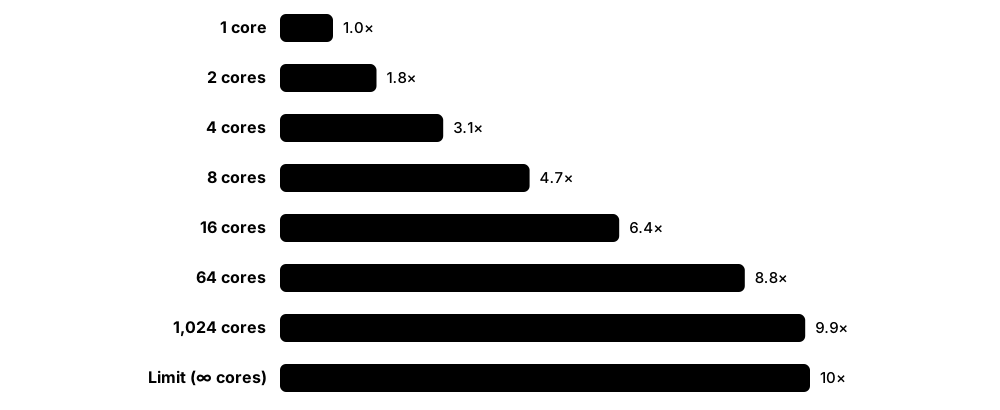
Think of it like…
Latency is how long one pizza takes to bake; throughput is how many pizzas the shop sells per hour — a bigger oven raises throughput without baking any single pizza faster.
Real-world example
Mei's video-render script takes 100 seconds: 90 seconds of work can run in parallel, but 10 seconds must run on one core. On 10 cores, Amdahl's law predicts 10 + 90 ÷ 10 = 19 seconds, about a 5.3× speed-up — and even with unlimited cores it can never beat 10 seconds (10×). Her teammate points out Gustafson's view: with 10 cores they could render a scene about ten times bigger in roughly the same time. Mei also realises that halving the instructions in the serial part would help as much as a faster clock.
How it works
- Clock rate is cycles per second (GHz); one cycle at 4 GHz lasts 0.25 ns.
- CPI (cycles per instruction), or its inverse IPC, shows how much work each cycle does.
- CPU time = instruction count × CPI ÷ clock rate — improving any of the three makes a program faster.
- Latency measures time per task, throughput measures tasks per second, and bandwidth measures data moved per second.
- Amdahl's law: speed-up = 1 ÷ ((1 − p) + p ÷ n), where p is the parallel fraction and n the number of processors.
- Benchmarks such as SPEC CPU, Geekbench and HPL give comparable scores on standard workloads.
Who uses it
Performance engineers, HPC specialists, game developers, cloud architects sizing servers and anyone buying hardware rely on these measures.
Key takeaway
Clock speed alone does not decide performance — think instruction count × CPI ÷ clock rate, and apply Amdahl's law before parallelising anything.
Going deeper
- The 'iron law' splits CPU time into instruction count (set by algorithm, compiler and ISA), CPI (set by microarchitecture and memory behaviour) and cycle time (set by circuit design and process) — every optimisation targets one factor.
- Wall-clock (elapsed) time includes waiting for disks, networks and other programs, while CPU time counts only cycles spent running your code; users feel wall-clock time, so report both.
- Peak FLOPS = cores × clock × FLOPs per cycle per core: a core with two 512-bit FMA units performs 2 units × 16 FP32 lanes × 2 operations = 64 FP32 FLOPs per cycle, which real code rarely sustains.
- Supercomputer lists report Rpeak (theoretical) and Rmax (achieved on HPL); large GPU systems typically reach roughly 60-80% of peak on HPL, and real applications usually achieve much less.
- Benchmark suites summarise many tests with a geometric mean of speed ratios (as SPEC does) so no single test dominates; for interactive services, tail-latency percentiles such as p99 matter more than averages.
- SPEC CPU 2026, released in May 2026 with 52 benchmarks in four suites, succeeds SPEC CPU 2017 and adds an optional energy metric, so expect vendors to quote both suites for a while.
- Gustafson's scaled speed-up, (1 − p) + p × n, explains why machines with millions of cores are useful: scientists grow the problem size with the machine instead of shrinking the run time.
Common mistakes & misconceptions
- Comparing CPUs by GHz alone: a 3.5 GHz chip with higher IPC can beat a 5 GHz chip, so compare benchmarks on your own workload.
- Reporting only average latency: a service averaging 20 ms may still make 1 in 100 users wait seconds, so track percentiles too.
- Ignoring Amdahl's law: buying four times the cores rarely gives four times the speed when part of the job is serial or I/O-bound.
- Mixing up throughput and latency: adding servers raises requests per second but does not make any single request faster.
Try it: Amdahl's law calculator in Python
def amdahl(p, n):
    return 1 / ((1 - p) + p / n)

for n in (2, 4, 8, 16, 64, 1_000_000):
    print(f'{n:>9} cores -> {amdahl(0.9, n):5.2f}x')
# 2 -> 1.82x, 8 -> 4.71x, 64 -> 8.77x ... never more than 10x
# when 10% of the work must run serially
Key chips, architectures, standards, tools & concepts
| Name | What it does | Example |
|---|---|---|
| Clock rate (frequency) Measured in hertz (MHz, GHz) · Metric · Current · Beginner |
Clock cycles per second; higher means more steps per second, but says nothing about how much work each step does. | A 5.0 GHz desktop CPU completes 5 billion cycles per second, each lasting 0.2 ns. |
| CPI and IPC Hennessy and Patterson terminology · Metric · Current · Intermediate |
Cycles Per Instruction and Instructions Per Cycle (IPC = 1 ÷ CPI); modern cores average several instructions per cycle. | A core reaching an IPC of 4 at 3 GHz retires about 12 billion instructions per second on that code. |
| CPU performance equation Hennessy and Patterson, 'Computer Architecture: A Quantitative Approach' · Concept · Current · Intermediate |
CPU time = instruction count × CPI × clock cycle time; shows how compilers, chip design and clock speed each contribute. | 2 billion instructions × CPI 0.5 ÷ 4 GHz = 0.25 seconds of CPU time. |
| MIPS (the metric) Millions of Instructions Per Second · Metric · Legacy · Intermediate |
An easy-to-quote speed figure that misleads, because instructions do different amounts of work on different processors. | A CPU with very simple instructions can post a higher MIPS figure yet finish a real program more slowly. |
| FLOPS Floating-point operations per second · Metric · Current · Beginner |
Floating-point operations per second; used for scientific and AI performance, quoted in giga-, tera-, peta- or exaFLOPS. | An exascale supercomputer sustains at least 10^18 FP64 operations per second on the HPL benchmark. |
| Latency General performance concept · Metric · Current · Beginner |
The time to complete one operation from start to finish, such as nanoseconds for memory or milliseconds for a web request. | A web page that takes 200 ms to appear has a latency of 200 ms as the user experiences it. |
| Throughput and bandwidth General performance concepts · Metric · Current · Beginner |
Throughput is work completed per second; bandwidth is the maximum rate at which a link or memory can move data. | A web server handling 20,000 requests per second has high throughput even if each request takes 50 ms. |
| Speed-up General performance concept · Metric · Current · Beginner |
The ratio of the old running time to the new running time after an improvement. | Cutting a job from 60 seconds to 15 seconds is a 4× speed-up. |
| Amdahl's law Gene Amdahl (1967) · Concept · Current · Beginner |
The overall speed-up is limited by the part of the work that cannot be improved or run in parallel. | If 5% of a program must run serially, no number of processors can make it more than 20× faster. |
| Gustafson's law John Gustafson (1988) · Concept · Current · Intermediate |
With more processors people usually tackle bigger problems in the same time, so scaled speed-up grows almost in line with processor count. | A weather centre doubles its cores and runs a forecast with twice as many grid points in the same time window. |
| Performance per watt Tracked for supercomputers by the Green500 list · Metric · Current · Beginner |
Useful work per unit of energy; now as important as raw speed for phones, laptops, data centres and supercomputers. | The Green500 list ranks supercomputers by gigaFLOPS per watt rather than by total speed. |
| SPEC CPU SPEC (Standard Performance Evaluation Corporation) · Benchmark · Current · Intermediate |
Industry-standard suites of real programs measuring CPU, memory and compiler performance; SPEC CPU 2026 (released May 2026) succeeds SPEC CPU 2017. | Server makers publish SPEC CPU results so buyers can compare processors on the same workloads. |
| Geekbench and Cinebench Primate Labs (Geekbench), Maxon (Cinebench) · Benchmark · Current · Beginner |
Popular consumer benchmarks giving single-core and multi-core scores for PCs, Macs and phones. | Laptop reviewers quote Geekbench and Cinebench single- and multi-core scores when comparing new chips. |
| HPL (High-Performance LINPACK) Jack Dongarra and colleagues; used by TOP500 · Benchmark · Current · Intermediate |
Solves a huge dense system of linear equations in FP64; the yardstick for the TOP500 supercomputer ranking. | Frontier's HPL result of about 1.1 exaFLOPS in May 2022 made it the first officially ranked exascale computer. |
| Wall-clock time vs CPU time Reported by the Unix time command, perf stat and profilers · Metric · Current · Beginner |
Wall-clock time is real elapsed time; CPU time is time actually spent executing on cores, summed across all threads. | time make -j8 reports real 1m10s but user 7m40s, showing that eight cores were busy for most of the build. |
| Peak vs sustained performance (Rpeak vs Rmax) TOP500 terminology; vendor datasheets · Metric · Current · Intermediate |
Peak is the theoretical maximum from the spec sheet; sustained is what a real benchmark or application achieves, usually much lower. | On the June 2026 TOP500 list, El Capitan's measured Rmax of about 1.8 exaFLOPS is well below its theoretical Rpeak. |
1.13 Moore's Law, Dennard Scaling and Process Nodes
In 1965 Gordon Moore noticed that the number of transistors on a chip was doubling at a steady pace — later settled at about every two years — and this 'Moore's law' held for decades. For a long time, smaller transistors were also faster and more power-efficient (Dennard scaling), but that bonus ended in the mid-2000s, so clock speeds stopped climbing and chips gained more cores instead. Chips are made in factories called fabs using generations of technology called process nodes, such as '3 nm' or '2 nm' — names that are now marketing labels rather than real measurements.
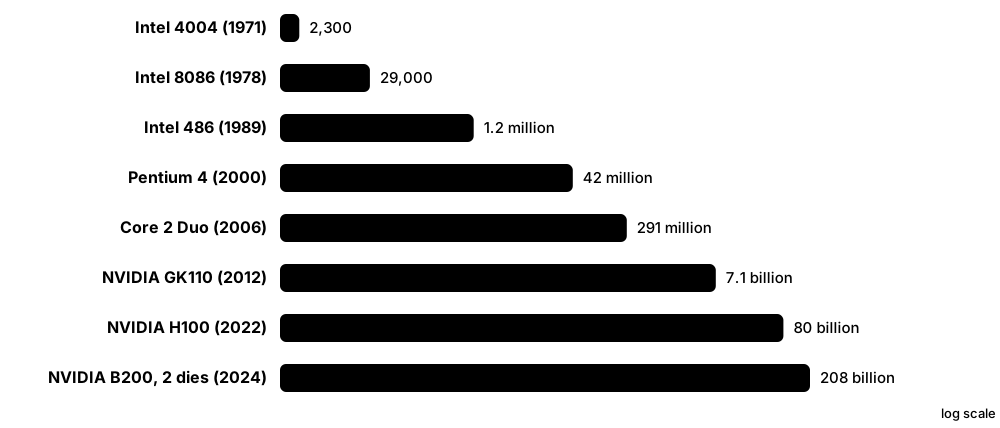
Think of it like…
Moore's law is like fitting ever more houses into the same town by making each one smaller; Dennard scaling was the bonus that smaller houses also needed less heating — until the walls got so thin that heat leaked everywhere.
Real-world example
Students at a fictional college, Westbrook Tech, line up three chips: the Intel 4004 from 1971 with about 2,300 transistors, a 2005 dual-core desktop processor with a few hundred million, and a 2024 AI GPU with over 200 billion. That is roughly a 100-million-fold increase in about 50 years. They also notice clock speeds climbed from 740 kHz to around 3-4 GHz by the mid-2000s and then barely moved — the point where Dennard scaling broke down.
How it works
- Fabs print transistors onto silicon wafers using lithography: light projects circuit patterns onto light-sensitive coatings.
- Shrinking features fits more transistors per square millimetre, lowering the cost of each transistor.
- Under Dennard scaling, smaller transistors used proportionally less power, so clocks could rise without overheating.
- Around 2005-2006 leakage current stopped voltages falling, so heat — the 'power wall' — became the main limit.
- The industry responded with multicore chips, specialised accelerators, 3D transistor shapes (FinFET, then gate-all-around) and chiplets.
- In 2026 the leading foundries (TSMC, Samsung, Intel) are shipping 2 nm-class nodes, and backside power delivery is arriving.
Who uses it
Semiconductor process engineers, chip designers, hardware analysts and anyone choosing or buying processors should understand nodes and scaling trends.
Key takeaway
A '2 nm' node contains no feature that is literally 2 nm wide — compare nodes by transistor density, performance and power, not by their names.
Going deeper
- Moore's 1965 article predicted the number of components per chip would double every year; in 1975 he revised it to about every two years, a pace the industry roughly kept until the 2010s before slowing.
- Dennard scaling ended because supply voltage stopped falling: near and below about 1 V, threshold-voltage limits and leakage current meant smaller transistors kept wasting power even when idle.
- Transistor shapes changed to keep leakage under control: planar devices until about 22 nm, FinFETs (Intel 2011-12, TSMC 16 nm in 2015), gate-all-around nanosheets (Samsung 2022, TSMC N2 and Intel 18A from 2025), with stacked CFETs next on roadmaps.
- Leading-edge fabs cost tens of billions of dollars, so only TSMC, Samsung and Intel compete at the frontier; Japan's Rapidus is aiming for 2 nm-class mass production around 2027.
- SRAM cells have shrunk much more slowly than logic at recent nodes, one reason designers move large caches onto separate stacked dies, as in AMD's 3D V-Cache.
- Cost per transistor stopped falling quickly after roughly the 28 nm era, so 'More than Moore' approaches — chiplets, advanced packaging and specialised accelerators — now deliver much of the progress.
Common mistakes & misconceptions
- Reading 'Moore's law is dead' as 'no more progress': density still rises, just more slowly and at a higher cost per wafer.
- Comparing node names across foundries: Intel 18A, TSMC N2 and Samsung SF2 differ in density and power, so compare published data instead.
- Confusing Moore's law with clock speed: transistor counts kept climbing after 2005 even though clock frequencies stalled.
Try it: Check Moore's law yourself with two data points
import math
start, end = 2_300, 208_000_000_000   # Intel 4004 (1971) vs NVIDIA B200 (2024)
doublings = math.log2(end / start)
print(round(doublings, 1))                   # ~26.4 doublings
print(round((2024 - 1971) / doublings, 2))   # ~2.0 years per doubling
Key chips, architectures, standards, tools & concepts
| Name | What it does | Example |
|---|---|---|
| Moore's law Gordon Moore, Electronics magazine (1965); revised in 1975 · Concept · Current · Beginner |
The observation that transistor counts per chip double roughly every two years; an industry target, not a law of physics. | Chipmakers planned their roadmaps for decades around delivering the next doubling on schedule. |
| Dennard scaling Robert Dennard and colleagues, IBM (1974) · Concept · Legacy · Intermediate |
As transistors shrink, voltage and current shrink too, keeping power per area constant; this broke down in the mid-2000s. | Clock speeds rose from tens of megahertz to about 3-4 GHz during the Dennard era, then largely levelled off. |
| Power wall and dark silicon Computer architecture research term · Concept · Current · Intermediate |
Chips now hold more transistors than can be powered at once without overheating, so parts must idle or slow down. | A phone chip switches off its big cores and AI engine when they are not needed to stay within a few watts. |
| Process node Foundry naming, e.g. TSMC N3/N2, Intel 18A, Samsung SF2 · Concept · Current · Beginner |
The name for a generation of chip-making technology; once a real gate length, now just a label for improvements. | TSMC's 'N3' and Intel's '18A' (meant to suggest about 1.8 nm) are node names, not physical measurements. |
| FinFET Developed at UC Berkeley; first mass-produced by Intel at 22 nm (2012) · Technology · Current · Intermediate |
A 3D transistor whose gate wraps around three sides of a raised silicon fin, reducing leakage compared with flat transistors. | Most leading-edge phone and PC processors from about 2012 to the mid-2020s were built with FinFETs. |
| Gate-all-around (GAA) nanosheet transistor Samsung MBCFET (3 nm, 2022), TSMC N2, Intel RibbonFET (18A) · Technology · Current · Intermediate |
A transistor whose gate completely surrounds stacked silicon sheets, giving better control at the smallest sizes. | Samsung's 3 nm process (2022) was first to production with GAA; TSMC N2 and Intel 18A brought it to more chips in 2025-2026. |
| Backside power delivery Intel PowerVia (18A); TSMC Super Power Rail (A16) · Technology · Emerging · Advanced |
Moves the power wiring to the back of the silicon wafer, leaving the front for signals; improves density and efficiency. | Intel's 18A 'Panther Lake' laptop chips, launched in January 2026, are among the first products with backside power. |
| TSMC Taiwan Semiconductor Manufacturing Company · Organisation · Current · Beginner |
The world's largest contract chipmaker (foundry), manufacturing chips designed by Apple, NVIDIA, AMD, Qualcomm and many others. | TSMC began volume production of its 2 nm-class N2 node in late 2025, with N2P following in 2026 and A16 moved to 2027. |
| Intel Foundry and Intel 18A Intel Corporation · Organisation · Current · Intermediate |
Intel makes its own chips and offers foundry services; its 18A node combines RibbonFET gate-all-around transistors with PowerVia backside power. | Core Ultra Series 3 'Panther Lake' laptop processors, launched at CES in January 2026, are Intel's first 18A products. |
| Samsung Foundry Samsung Electronics · Organisation · Current · Intermediate |
A major foundry and the first to ship gate-all-around transistors; its SF2 2 nm-class node entered mass production in late 2025. | The Exynos 2600 phone chip, used in Galaxy S26 models in many countries, is built on Samsung's 2 nm process. |
| EUV lithography ASML (sole supplier of EUV scanners) · Technology · Current · Intermediate |
Prints chip patterns with 13.5 nm extreme-ultraviolet light; essential for 7 nm-class nodes and smaller. | Leading-edge chips for phones and AI GPUs have layers patterned by ASML EUV scanners, each costing well over €100 million. |
| High-NA EUV ASML EXE series scanners · Technology · Emerging · Advanced |
Next-generation EUV with a larger lens opening (0.55 NA) for finer patterns, aimed at 1.4 nm-class nodes and beyond. | Intel was first to install ASML's High-NA scanners and plans to use them for its 14A node. |
| Transistor density Million transistors per mm² (MTr/mm²) · Metric · Current · Intermediate |
Transistors per square millimetre — a more honest way to compare process nodes than their names. | Leading-edge logic processes pack well over 100 million transistors into each square millimetre. |
| More than Moore: chiplets and 3D packaging e.g. TSMC CoWoS, Intel Foveros, UCIe interconnect standard · Technology · Current · Intermediate |
Keeping progress going as shrinking slows by joining several smaller dies side by side or stacked in one package; detailed in the processors chapter. | NVIDIA's B200 joins two large GPU dies in one package, and AMD EPYC CPUs combine many CPU chiplets with an I/O die. |
| Silicon wafer (300 mm) Wafer makers such as Shin-Etsu, SUMCO and GlobalWafers · Component · Current · Beginner |
A thin, polished disc of ultra-pure crystalline silicon on which hundreds of chips are made at once; 300 mm is the leading-edge size. | One 300 mm wafer of a mid-sized phone chip can hold several hundred dies, which are tested, cut apart and packaged. |
| CFET (complementary FET) Research roadmaps from imec, Intel, TSMC and Samsung · Technology · Emerging · Advanced |
A future transistor that stacks the n-type and p-type devices of a CMOS pair on top of each other, roughly halving logic-cell area. | Research groups have demonstrated stacked CFET inverters, with production expected only after today's 2 nm and 1.4 nm-class generations. |
1.14 Orders of Magnitude: Prefixes and Latency Numbers
Computing covers enormous ranges: one CPU step takes a fraction of a nanosecond, while a message to another continent takes hundreds of millions of times longer. Engineers use prefixes such as nano, micro, milli, kilo, mega and giga to talk about these scales, and memorise rough 'latency numbers' so they can quickly judge whether a design will be fast. Getting the order of magnitude (the power of ten) right matters far more than being exact.
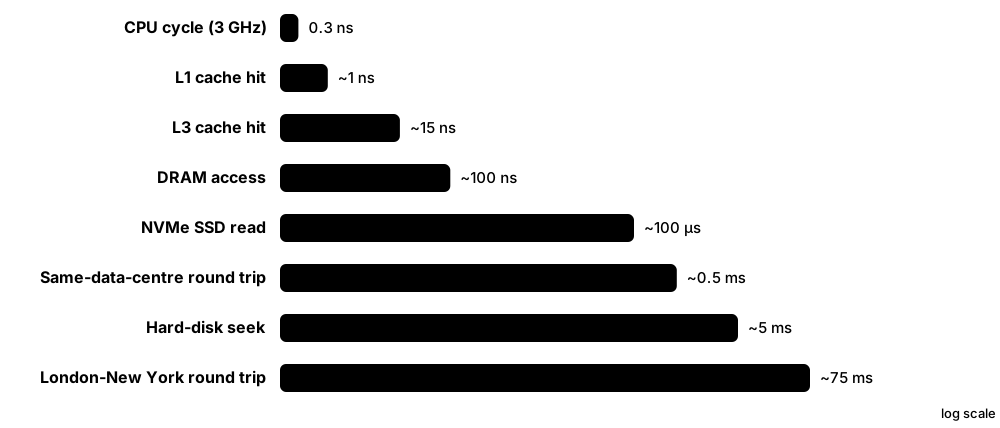
Think of it like…
If one CPU cycle (about 0.3 ns) were stretched to one second, reading main memory would take about five minutes, an SSD read about four days, and a packet to another continent about fifteen years.
Real-world example
Jonas, a junior developer at a fictional delivery app called Parcelpath, must decide where to keep user sessions. Main memory answers in about 100 ns, a local NVMe SSD in roughly 100 µs (1,000× slower), and a database in another region in about 50-150 ms (another 1,000× slower). Each page load needs 20 session reads, so the cross-region design would add up to around two seconds, while an in-memory cache adds only microseconds. A quick back-of-the-envelope estimate settles the debate before anyone writes code.
How it works
- Learn the SI prefixes in steps of 1000: nano (10^-9), micro (10^-6), milli (10^-3), kilo (10^3), mega (10^6), giga (10^9), tera, peta, exa, zetta.
- Memorise rough latencies: cache ~1-10 ns, RAM ~100 ns, SSD ~10-100 µs, hard disk ~5-10 ms, intercontinental ~100-150 ms or more.
- Multiply counts by costs for a back-of-the-envelope estimate (number of operations × time per operation).
- Compare options by ratio: a 1000× gap always matters, a 10% gap rarely does at the design stage.
- Measure afterwards to confirm, because real hardware varies by generation and workload.
Who uses it
Software and systems engineers, site reliability engineers, cloud architects and candidates in system-design interviews use these numbers all the time.
Key takeaway
In system-design interviews, say approximate latencies and do quick estimates out loud — interviewers care about the right order of magnitude, not exact figures.
Going deeper
- Powers of two approximate powers of ten: 2^10 ≈ 10^3, so 2^20 is about a million, 2^30 about a billion and 2^40 about a trillion — handy for quick memory and address-space estimates.
- A day has 86,400 seconds (≈ 10^5) and a year about 31.5 million (≈ π × 10^7); dividing a daily total by 10^5 gives a quick average per-second rate.
- Little's law (items in the system = arrival rate × time each spends there) turns latency into capacity: 1,000 requests per second taking 50 ms each means about 50 requests in flight at once.
- Bandwidth and latency are independent: a van full of hard drives has huge bandwidth but terrible latency, and the bandwidth-delay product tells you how much data must be in flight to keep a link busy.
- Since the classic latency list was written, DRAM latency has barely improved, SSDs have become roughly 100× faster than disks, and RDMA networks have cut in-data-centre messages to a few microseconds.
- Energy follows orders of magnitude too: fetching 64 bits from DRAM costs about a hundred times or more the energy of a 64-bit floating-point operation, so data movement dominates chip power budgets.
Common mistakes & misconceptions
- Mixing ms, µs and ns in one estimate: convert everything to a single unit first, because a 1,000× slip reverses conclusions.
- Assuming network calls are free because the LAN is fast: half a millisecond per call adds up when a page makes hundreds of sequential calls.
- Treating memorised latency numbers as exact: they shift with each hardware generation, so use them for orders of magnitude and measure real systems.
Try it: Turn nanoseconds into human time
latency_ns = {
    'L1 cache hit': 1,
    'Main memory (DRAM)': 100,
    'NVMe SSD random read': 100_000,
    'Hard disk seek': 5_000_000,
    'Packet to another continent': 150_000_000,
}
# pretend one 0.3 ns CPU cycle lasts 1 second
for name, ns in latency_ns.items():
    secs = ns / 0.3
    print(f'{name:30} {secs:>14,.0f} s  (~{secs / 86400:,.1f} days)')
Key chips, architectures, standards, tools & concepts
| Name | What it does | Example |
|---|---|---|
| Large SI prefixes (kilo to quetta) BIPM / CGPM (ronna and quetta added in 2022) · Standard · Current · Beginner |
Powers of 1000 from kilo (10^3) through mega, giga, tera, peta, exa (10^18), zetta and yotta, up to ronna and quetta (10^30). | Supercomputer speed is now measured in exaFLOPS, and global yearly data in zettabytes. |
| Small SI prefixes (milli to pico) BIPM — International System of Units · Standard · Current · Beginner |
milli (10^-3), micro (10^-6), nano (10^-9) and pico (10^-12); used for times, voltages and sizes. | A 3 GHz clock cycle lasts about 333 picoseconds, or 0.33 nanoseconds. |
| Nanosecond One billionth (10^-9) of a second · Metric · Current · Beginner |
One billionth of a second; light in a vacuum travels only about 30 cm in that time. | Computing pioneer Grace Hopper handed out 30 cm lengths of wire to show audiences what a nanosecond looks like. |
| Latency numbers every programmer should know Popularised by Jeff Dean and Peter Norvig · Resource · Current · Intermediate |
A list of approximate times for common operations, from a cache hit to a cross-continent round trip, used for quick estimates. | Engineers recall that RAM is about 100× slower than L1 cache and about 1,000× faster than an SSD read. |
| Cache latency (L1, L2, L3) Varies by CPU generation · Metric · Current · Intermediate |
Roughly 1 ns for L1, a few nanoseconds for L2 and about 10-20 ns for L3 on modern processors. | A loop over a small array that fits in L1 runs many times faster than one scanning gigabytes of RAM. |
| DRAM access latency Varies by memory type and platform · Metric · Current · Intermediate |
About 80-120 ns for the CPU to fetch from main memory — hundreds of CPU clock cycles. | A cache miss to DRAM on a 4 GHz core costs around 400 cycles, during which that work may stall. |
| SSD and hard-disk latency Varies by device · Metric · Current · Beginner |
NVMe SSD reads take tens of microseconds to about a tenth of a millisecond; hard-disk seeks take several milliseconds. | Swapping a boot hard disk for an SSD turns a one-minute start-up into seconds because thousands of small reads become about 100× faster. |
| Network round-trip time (RTT) Measured with ping and similar tools · Metric · Current · Beginner |
The time for a packet to reach a destination and come back: well under 1 ms inside a data centre, roughly 70-300 ms between continents. | A ping from London to New York typically shows around 70-80 ms. |
| Speed of light in fibre Physics of optical fibre · Concept · Current · Beginner |
Light in glass fibre travels at about 200,000 km per second, roughly two-thirds of its speed in a vacuum — a hard limit on latency. | A 6,000 km fibre route adds at least 30 ms each way, however fast the routers are. |
| Throughput scales (Gbit/s, GB/s, TB/s) General performance units · Metric · Current · Beginner |
Data rates range from megabits per second on mobile links to terabytes per second inside AI accelerators. | Home broadband might give 1 Gbit/s, a fast NVMe SSD over 10 GB/s, and an AI GPU's HBM memory several TB/s. |
| Back-of-the-envelope estimation Engineering practice · Concept · Current · Beginner |
Quickly multiplying rough counts by rough costs to judge whether something is feasible before building it. | 1 million users × 10 requests a day ≈ 116 requests per second on average — easy for one modest server. |
| Logarithmic scale Mathematics · Concept · Current · Beginner |
A scale where each step is a multiple (such as ×10), making huge ranges readable on one chart. | Moore's law is plotted on a log scale, so 50 years of doubling appear as a nearly straight line. |
| Exascale 10^18 FLOPS; first reached on the TOP500 by Frontier (2022) · Metric · Current · Beginner |
Computing at 10^18 — a billion billion — floating-point operations per second. | An exascale machine does in one second what a person doing one sum per second would need about 31.7 billion years to finish. |
| Powers-of-two rule (2^10 ≈ 10^3) Engineering rule of thumb · Concept · Current · Beginner |
Because 1,024 is close to 1,000, every extra 10 bits multiplies a count by about a thousand, making binary sizes easy to estimate. | A 48-bit address space is 2^8 × 2^40, about 256 trillion bytes (256 TiB), worked out without a calculator. |
| Bandwidth-delay product Networking and performance engineering · Concept · Current · Intermediate |
Link speed multiplied by round-trip time: the amount of data that must be in flight to keep a connection fully busy. | A 10 Gbit/s link with an 80 ms round trip needs about 100 MB in flight, so TCP windows must grow very large. |
1.15 A Short History of Computing: From Babbage to Exascale
Modern computers are the result of about two centuries of ideas and inventions, from mechanical calculating engines to chips with hundreds of billions of transistors. Each step — theory, vacuum tubes, transistors, integrated circuits, microprocessors, personal computers, smartphones and AI accelerators — made computing smaller, cheaper and more powerful. Knowing the timeline helps you understand why today's machines look the way they do.
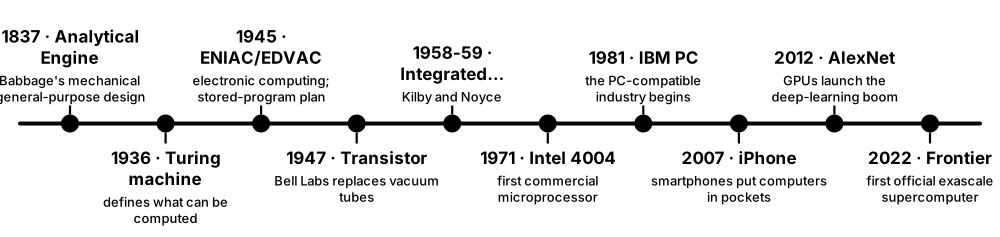
Think of it like…
Computing history is like a relay race: Babbage and Lovelace drew the map, Turing and von Neumann wrote the rules, and each generation of engineers took the baton and ran faster with smaller, cheaper parts.
Real-world example
For a history poster, Aisha picks five milestones: ENIAC (1945), a room-sized machine with about 18,000 vacuum tubes drawing roughly 150 kW; the Intel 4004 (1971), a whole CPU on one chip with about 2,300 transistors; the IBM PC (1981), which made the personal computer an everyday business tool; the iPhone (2007), which put a powerful computer in millions of pockets; and Frontier (2022), the first officially ranked exascale supercomputer. In under 80 years computers went from filling a room to fitting in a palm, while becoming trillions of times faster.
How it works
- 1800s: mechanical ideas — Babbage designs the Analytical Engine and Ada Lovelace publishes an algorithm for it.
- 1930s-40s: theory and electronics — Turing's universal machine (1936), Shannon's switching circuits, Colossus, ENIAC and the first stored-program computers.
- 1947-1971: the transistor, the integrated circuit and the first microprocessor (Intel 4004) shrink computers dramatically.
- 1970s-1990s: personal computers (Apple II, IBM PC), Arm's low-power RISC chips and the first GPUs.
- 2000s: multicore processors, smartphones (iPhone 2007, Android 2008) and cloud computing.
- 2010s-2020s: GPUs power deep learning, exascale supercomputers arrive (Frontier, 2022) and generative AI goes mainstream.
Who uses it
Students, teachers, technology journalists, and anyone asked in an interview or exam to explain how computing evolved will find this timeline useful.
Key takeaway
Memorise a handful of anchor dates: 1936 Turing, 1945 ENIAC, 1947 transistor, 1971 Intel 4004, 1981 IBM PC, 2007 iPhone, 2022 Frontier exascale.
Going deeper
- Computer generations are often grouped by switching technology: vacuum tubes (1940s-50s), discrete transistors (late 1950s-60s), integrated circuits (1960s-70s) and microprocessors (1970s onwards).
- Colossus stayed secret until the 1970s, which is partly why ENIAC was long called the first electronic computer; the Manchester Baby of 1948 was the first to run a program stored in its own memory.
- IBM's System/360 (1964) offered one instruction set across a family of compatible machines of different speeds — separating architecture from implementation, the idea that x86 and Arm still follow.
- Software milestones matter as much as hardware: FORTRAN (1957) made compilers practical, UNIX and C (early 1970s) made operating systems portable, and Linux (1991) now runs most servers and every TOP500 supercomputer.
- Clock speeds rose roughly a thousandfold from the 1970s to the mid-2000s and then flattened around 3-5 GHz; since then gains have come from more and wider cores, accelerators and smaller number formats.
- On the June 2026 TOP500 list China's LineShine took first place at about 2.2 exaFLOPS, ending El Capitan's run at the top and becoming the fifth exascale system on the list.
Common mistakes & misconceptions
- Calling ENIAC 'the first computer' without qualification: Colossus, the Atanasoff-Berry Computer and Zuse's Z3 came earlier in different forms, so precise claims need qualifiers.
- Assuming Ada Lovelace built hardware: she analysed and wrote programs for Babbage's Analytical Engine, which was never completed.
- Thinking history is irrelevant to the job: x86's 1978 roots explain its variable-length instructions and legacy modes that engineers still handle today.
Try it: Compare then and now with quick arithmetic
eniac_adds_per_s = 5_000      # ENIAC (1945), about 5,000 additions per second
frontier_flops = 1.1e18       # Frontier HPL result (2022)
print(f'{frontier_flops / eniac_adds_per_s:.1e}x faster')    # ~2.2e+14
print(f'{208e9 / 2300:,.0f}x more transistors (4004 -> B200)')
Key chips, architectures, standards, tools & concepts
| Name | What it does | Example |
|---|---|---|
| Analytical Engine Charles Babbage (designed from 1837) · System · Legacy · Beginner |
Babbage's design for a general-purpose mechanical computer with a 'mill' (processor) and a 'store' (memory); never completed. | Its split between mill and store foreshadowed the CPU and memory of modern computers. |
| Ada Lovelace's notes Ada Lovelace (1843) · Resource · Legacy · Beginner |
Her notes on the Analytical Engine included a method for computing Bernoulli numbers, often called the first published computer program. | Ada Lovelace Day, held every October, celebrates women in science, technology, engineering and maths. |
| Turing machine Alan Turing, 'On Computable Numbers' (1936) · Concept · Current · Beginner |
An imaginary machine — a tape, a read/write head and rules — that defines what any computer can calculate in principle. | Calling a programming language 'Turing complete' means it can compute anything a Turing machine can. |
| Colossus and ENIAC Tommy Flowers (Colossus, 1944); J. Presper Eckert and John Mauchly (ENIAC, 1945) · System · Legacy · Beginner |
Early electronic computers built from vacuum tubes: Colossus helped break wartime codes at Bletchley Park; ENIAC was general-purpose. | ENIAC used about 18,000 vacuum tubes and was programmed by setting switches and plugging cables. |
| Manchester Baby University of Manchester — Williams, Kilburn and Tootill (1948) · System · Legacy · Intermediate |
The first electronic stored-program computer, which ran its first program on 21 June 1948. | Its first program, finding the highest factor of 2^18, ran for 52 minutes. |
| Integrated circuit (1958-59) Jack Kilby (Texas Instruments) and Robert Noyce (Fairchild) · Technology · Current · Beginner |
Many transistors and their connections made together on one piece of semiconductor, enabling cheap mass-produced electronics. | The Apollo Guidance Computer of the 1960s was one of the first computers built from integrated circuits. |
| Intel 4004 (1971) Intel (Federico Faggin, Ted Hoff, Stan Mazor) with Busicom's Masatoshi Shima · Processor · Legacy · Beginner |
The first commercial single-chip microprocessor: 4-bit, about 2,300 transistors, running at up to 740 kHz. | It was designed for a Busicom desktop calculator but proved a whole CPU could fit on one chip. |
| IBM PC (1981) IBM (model 5150) · System · Legacy · Beginner |
A personal computer with an Intel 8088 CPU and Microsoft's MS-DOS; its open design created the 'PC compatible' industry. | Today's Windows PCs still descend from the IBM PC's x86 architecture. |
| Arm architecture (1985) Acorn Computers; now Arm Holdings · Architecture · Current · Beginner |
A low-power RISC design first built by Acorn in Britain; it now powers almost all smartphones and many laptops and servers. | The first ARM1 chip ran in 1985; today Apple's M-series Macs and AWS Graviton servers use Arm-based processors. |
| GPU (1999 onwards) NVIDIA GeForce 256, marketed as the first 'GPU' · Accelerator · Current · Beginner |
Graphics chips with many parallel units; they became programmable for general maths (CUDA, 2006-07) and now drive AI. | AlexNet's 2012 image-recognition win, trained on two NVIDIA gaming GPUs, kicked off the deep-learning boom. |
| Multicore processors (2000s) IBM POWER4 (2001); AMD and Intel desktop dual-cores (2005) · Processor · Current · Beginner |
Several CPU cores on one chip, adopted once the power wall stopped clock speeds rising. | In 2005 AMD's Athlon 64 X2 and Intel's Pentium D brought dual-core chips to home PCs. |
| Smartphone era (2007 onwards) Apple iPhone (2007); Google Android (2008) · System · Current · Beginner |
Phones became general-purpose pocket computers built on Arm system-on-chips — the most widespread computers ever made. | A mid-range phone today packs a multi-core CPU, a GPU and an AI engine onto one chip smaller than a fingernail. |
| Exascale and the AI era (2020s) Frontier (ORNL, 2022); El Capitan (LLNL); LineShine (NSCS Shenzhen) · System · Current · Beginner |
Supercomputers passed 10^18 FLOPS, and AI clusters with tens of thousands of GPUs now train generative models. | Frontier became the first official exascale system in 2022; on the June 2026 TOP500 list China's LineShine ranked first at about 2.2 exaFLOPS. |
| UNIX and C (1969-1973) Ken Thompson and Dennis Ritchie, Bell Labs · Software · Current · Beginner |
A portable operating system and the language it was rewritten in; their ideas live on in Linux, macOS, Android and most modern languages. | Commands like ls and cat that students type in a Linux terminal today descend directly from 1970s Bell Labs UNIX. |
| Cloud era (2006 onwards) Amazon Web Services (S3 and EC2, 2006); later Microsoft Azure and Google Cloud · Service · Current · Beginner |
Renting computing over the Internet by the hour or second, turning servers into a utility anyone can use without buying hardware. | In 2006 a start-up could launch EC2 virtual servers with a credit card instead of buying and racking its own machines. |